CAS UK

Frequently Asked Questions

Your questions, answered with care

Whether you are considering membership, navigating a contribution, or helping a family during a difficult time — CAS-UK volunteers have compiled answers to the questions we hear most. Browse by category or use the search above.

Member sign-in: Adult and student members can add a verified secondary email in My Profile. Password login accepts your primary or verified secondary address with the same password; social sign-in works when the provider email matches either. See Logging In & Password below for details.

Registration & Joining

How do I start my journey as an adult member online?

Taking your first step into the CAS-UK community is a seamless digital experience designed to get your family protected as quickly as possible. Your journey begins at the official Adult Registration Form.

During this phase, you are building the foundation of your digital record. You’ll be asked to provide your primary contact details, address, and a specific "Display Name" that will represent you during contribution campaigns. If you have already been welcomed by a local community chapter, you can enter their Group ID during this step; if not, don’t worry—our system will automatically find the best match for you post-submission.

Once you submit, our registrars will review your profile to ensure it aligns with our community standards. You will receive a series of automated emails guiding you through the next milestones: initial contribution payment, account activation, and finally, your invitation to the live member dashboard.

Note: Registration is an "expression of interest" that kicks off the formal vetting process. Your active membership status only begins once your first contribution is cleared by your local Group Admin.
How do I register someone who is under 18?

Securing the future of your children and younger dependents is a core mission of CAS-UK. Because minors cannot legally enter into a mutual support agreement on their own, we’ve created a specialized Under-18 Registration Form.

Family registration illustration

The Registration Process:

  • Parent/Guardian Linkage: You must first identify yourself as the responsible adult for the record.
  • Accurate DOB: Providing the exact Year, Month, and Day of birth is critical for determining eligibility thresholds as they grow.
  • Display Name: Choose a name that honors their presence in the community while protecting their privacy as they participate in family-linked campaigns.

Once registered, the minor is "wrapped" under your household coverage. As they approach their 18th birthday, our system will automatically notify you about the transition process to full adult membership with their own direct digital wallet.

What information does the adult registration form ask for?

The adult registration form is your structured introduction to CAS-UK: it captures who you are, where you belong geographically, and how we can reach you when campaigns or verification matter. National registrars and your future Group Admin rely on these fields to avoid duplicate records, route you to the right chapter, and keep mutual support auditable. Nothing here is decorative—each block maps to vetting, SMS delivery, or secure email. Take your time on a calm connection; corrections later are slower than getting it right the first time.

Registration and joining journey on CAS-UK

You will typically provide identity and household context, your address for group placement, reliable phone numbers for urgent notices, and email addresses for login and receipts. Optional fields may capture next-of-kin or chapter hints depending on the live form.

Primary identity

Full legal names, birth year, and your community Display Name (how peers see you on live lists).

Physical locality

Street address and postal code so you are matched to a supportive regional chapter.

Phones & SMS

Up to two numbers with correct country codes (for example +44 UK, +237 Cameroon) for campaigns and one-time codes.

Email & kin

Primary email (entered twice to prevent typos) and optional next-of-kin contact where the form allows.

Before you submit

  • Match spelling to your ID; mismatches delay vetting.
  • Use inboxes you check weekly—password resets and campaign mail land there.

Important: Accurate phone and email are how we confirm who you are during contribution rounds and emergencies. Treat them like part of your membership duty, not optional extras.

What happens after I submit a registration form?

Submission is just the beginning. To maintain the integrity of our mutual support model, every applicant goes through a multi-stage vetting process.

1. Digital Queueing

Your data is transmitted to our national registrar and your prospective Group Admin receives an instant notification.

2. Verification Review

Administrators check for duplicates and verify your physical location to ensure you are assigned to a supportive local chapter.

3. Contribution Clearance

You will be contacted regarding your joining fee. Once this is cleared, your account status is updated to "Active".

4. Dashboard Invitation

An activation email arrives, inviting you to create your secure password and access your digital wallet for the first time.

Is there a joining fee or registration fee?

CAS-UK is a community-funded mutual support initiative. While the digital registration process is free to start, becoming a full member requires a financial commitment that powers our safety net.

The Fee Structure:

  • Joining Contribution: A one-time initial payment that seeds your presence in the community fund.
  • Annual Renewal: A yearly membership fee that maintains your "Active" status and covers platform operational costs.

The exact amount varies based on your local Group Admin’s chapter rules and current community scales. We recommend discussing these details with your local leader even before submitting your form, as their clearance is required for the final activation of your digital wallet.

Note: Membership is not guaranteed until the joining contribution is cleared. Proactive payment ensures your family is protected during the very next campaign event.
What is the "display name" and why does it matter?

Your Display Name is the label CAS-UK shows on live contribution walls, chapter lists, and many in-portal summaries. Your legal names still sit behind the scenes for vetting and banking, but the Display Name is what neighbours and Group Admins greet in daily community life. Choosing it well reduces confusion when several families share a surname. You can update it later for spelling or dignity, within the rules your profile screen shows.

Think of it as your “community face”: memorable, respectful, and stable enough that people recognise you across campaigns and years.

Member profile area where display name is managed

Visibility

Shown on live contribution streams and many member-facing lists.

Legal name

Used for verification; remains controlled for audit.

Privacy

Lets households participate without exposing full legal names everywhere.

After activation, open Profile to adjust Display Name; legal identity fields stay locked except through official change processes.

Does registering online create my member login immediately?

In one word: no. Submitting the online form creates an application record, not a live member login. CAS-UK is built on vetted mutual support, so opening a password-protected dashboard before identity and money checks complete would weaken the whole pool.

National staff and your Group Admin must confirm you are in the right chapter, that your details match policy, and that joining contributions follow the published path. That sequence protects both grieving families who receive support and every household that pays in. Expect email updates while your status moves from pending toward active.

Registration pathway before member login is issued

Your login is issued only after:

  1. Your geographical address is validated for group placement.
  2. A local Group Admin accepts you into their chapter (or national routing completes).
  3. Your initial joining contribution is cleared per national rules.

When those steps complete, you receive a secure account activation email. Use it promptly to set your password and access your dashboard for the first time.

Where can I read more about membership before I join?
Can I choose which group to join during registration?

Yes—we encourage you to join the chapter where you have the strongest local bonds or familial ties.

The registration form includes an optional Group ID field. If you already have a friend or leader in the community, ask them for their group number and enter it during registration. This ensures your application is instantly routed to the correct Admin for faster vetting.

Leaving it blank? If you are new or not yet connected to a chapter, simply leave the field empty. Our national registrars will assign you to the nearest geographical group or a general chapter, ensuring you are never left without local oversight and peer support.

Note: You can request a group transfer later if your circumstances change or if you find a more suitable local chapter.
What phone number format should I use on the form?

Precision in phone formatting is not just about data accuracy; it is the vital link that ensures you receive urgent SMS campaign broadcasts and verification codes.

How to use the dropdown:

  • First, select the correct flagship icon for your region (e.g. United Kingdom for +44, Cameroon for +237).
  • Then, enter the rest of your number (e.g. 7123... or 677...) without including leading zeros or additional plus signs.
Phone number field illustration

Pro-Tip: We encourage providing a secondary phone number from a different household member. This ensures multiple alerts hit your family unit simultaneously when an urgent campaign is called.

Can I register on behalf of a family member?

Absolutely. We understand that some family members may have limited digital access or need assistance navigating the application process.

When acting as a family registrar, please keep These legal requirements in mind:

  • Legal Accuracy: Ensure the names, birth year, and address are matching their primary government identification to avoid vetting delays.
  • Email Ownership: Ideally, each adult member should have their own unique email to receive secure password resets. If sharing an email, ensure BOTH parties are present during secure login attempts.
  • Consent: By submitting the form, you are affirming that the individual has consented to join the CAS-UK mutual support system.

For dependents under 18, skip the adult form and use the Under-18 Form instead.

Why does the form ask for my email twice?

Your email is the anchor for CAS-UK digital life: campaign launches, contribution receipts, password resets, and security messages all route through it. If it is wrong by one character, you may never see a reset link or a time-critical notice—and support has to spend days untangling avoidable mistakes.

That is why the form asks for the same address twice. The duplicate field is not bureaucracy; it is a simple human-error trap that catches thumb-typing on phones and autofill glitches before your record is saved.

How the match guard works

  • 1 Enter your email in the first field.
  • 2 Re-type it in the confirmation field (do not paste blindly without reading).
  • 3 Submit stays disabled until both strings match character for character.
Email fields on the registration journey

Use an address you control for the next several years; shared household inboxes are fine only if everyone agrees who may act on CAS-UK mail.

Is my data safe when I register online?

Security is not an afterthought; it is built into the very architecture of the CAS-UK platform. When you register, your data is protected by the same enterprise-grade standards used by global financial institutions.

AES-256 Encryption: Your data is encrypted both in transit (using HTTPS) and at rest within our secure databases.
GDPR Compliance: We adhere strictly to UK Data Protection laws, ensuring your personal details are used ONLY for community administration.

We do not share your data with 3rd-party marketers. Your details exist solely to facilitate the mutual support model between you, your Group Admin, and the national registrar team. Read the full Privacy Policy here.

What membership types are available?

To ensure protection for every face in your household, CAS-UK offers two distinct membership categories, each tailored to different levels of community contribution:

1. Adult Membership (18+)

The standard pathway for independent community participants. Adult members maintain their own digital wallets, contribute to active campaigns, and are entitled to the full range of distribution benefits.

2. Under-18 Membership

A protected pathway for minors. These records are linked to a responsible Adult Guardian/Parent. While they benefit from community coverage, their contributions and records are managed by their linked adult until their 18th birthday.

Choosing the correct type during registration ensures you are assigned to the right vetting queue and reduces the time needed for final activation.

Can I tick "Send me a copy of my responses" on the form?

Yes—and we encourage it whenever the form offers “Send me a copy of my responses.” That single tick generates a personal audit trail you can file, forward to a family member who helped you type, or compare against what your Group Admin sees later.

The digest is generated automatically when you submit; it is not a marketing message. It typically arrives within minutes and mirrors the key fields you entered so you can spot a wrong digit in a phone number or a mis-typed street before vetting begins.

Submission proof

Confirms the server captured your application at a specific time.

Detail review

Lets you re-read Display Name, phones, and address away from the small screen.

If nothing arrives within about fifteen minutes, check Spam/Promotions, then email registration@cas-uk.org from the same address you used on the form.

How long does it take for my registration to be processed?

Integrity takes time. To ensure that every member is "known and trusted," your application passes through two distinct human checks.

Standard Processing Timeline:

  • Initial Review (1-3 Days): National registrars verify your basic details and ensure no duplicate records exist.
  • Admin Vouching (2-5 Days): Your local Group Admin reviews your profile and may contact you directly to discuss joining contributions.

Once your Group Admin clears your profile, you are activated instantly. While the average turnaround is 3-5 business days, we recommend reaching out to your local leader if you haven't heard back within a week, as they are the final gatekeepers for your activation badge.

What documents do I need to register?

The online interest form does not require any instant document uploads, ensuring a barrier-free first step into our community. However, formal "Active" status often requires secondary verification.

Be prepared to provide your Group Admin with the following upon request:

  • Proof of Identity: A digital copy of a government-issued ID (Passport, National ID, or Driving License).
  • Proof of Residency: For regional group assignment, some chapters require a simple utility bill or proof of local community presence.
  • Marriage/Birth Certificates: Only required if you are registering as a family unit or adding dependents to an existing record.

Your Group Admin will provide a secure channel (usually through direct chat or email) for these documents; never post sensitive ID documents on public social media walls.

I submitted the form but did not receive a confirmation email. What should I do?

Digital delivery is usually instant, but technical or security hurdles can sometimes delay the confirmation ping. If your inbox is still empty after submission, follow this checklist:

  1. 1. Checked Spam? Mail servers (especially Gmail and Outlook) often misflag automated registrations as "Promotions" or "Spam".
  2. 2. Wait 30 Minutes: High-traffic rounds can occasionally cause a short delay in the automated mail-queue.
  3. 3. Direct Contact: Send a quick email to registration@cas-uk.org. Provide your full name and time of submission—our registrars can then manually confirm if your data is healthy in our system.

Once we confirm your submission, we'll manually push your next activation link to ensure your journey continues without delay.

Logging In & Password

Where do I log in as a member?

Once your record is active, you can access your personal safety net through our official Member Login Portal.

To sign in with email and password, use your primary member email or a verified secondary email you have added in My Profile—both use the same password. See also Can I add or use a secondary email? below. Once logged in, you will be taken to your Member Dashboard, which acts as the mission-control center for your membership:

Live Wallet Balance
Contribution History
Active Campaign Notices
Profile & Dependency Management
Can I add or use a secondary email for member login?

Adult and student members (types 1–2) can add a secondary email from My Profile. We send a verification link to that address; it only becomes active for sign-in after you complete that step.

For password login, enter either your primary member email or your verified secondary email, plus your usual member password—one account, one password, two allowed addresses.

For social sign-in (Google, Yahoo, Microsoft), the provider email must match your primary address or your verified secondary address on file.

Forgot password: You can request a reset using your primary or verified secondary email on the member login page; the message goes to the address you enter.

Social sign-in (Google, Yahoo, Microsoft): pop-ups and linking

Member login can use Google, Yahoo, or Microsoft when the email on that account is exactly the same as your primary member email or your verified secondary email on file. Sign-in uses small pop-up windows controlled by your browser.

Pop-up blocker

If nothing happens after you click a social button, your browser may be blocking pop-ups. Look for an icon in the address bar (often a small window or “blocked” symbol), choose Always allow pop-ups for this CAS-UK site, then click the button again.

Some flows need two pop-ups in a row (for example, Microsoft first, then Google to complete linking). Allow pop-ups before you start, or approve each prompt when it appears.

Linking Microsoft when you already use Google (or Yahoo)

If your membership email is tied to an existing Google or Yahoo sign-in, the first time you use Microsoft you may see a message asking you to sign in with Google or Yahoo using the same email so your Microsoft identity can be linked. After that one-time step, you can often use Microsoft alone on future visits.

Outlook / Hotmail only vs Gmail

If your on-file address is a Microsoft consumer address (e.g. Outlook.com, Hotmail, Live) and you have never used Google sign-in on CAS-UK for that email, Microsoft-only sign-in may complete in one step. If the same person previously used Google for that email on our site, you will need the short linking step above—using a “pure” Hotmail account only helps when that address is the one we hold and Google was not used before for CAS-UK.

You can always use email and password on the same page if social sign-in is inconvenient.

Where do Group Admins log in?

Group Administrators handle the critical day-to-day vetting and support of their local community chapters. They access their specialized tools at the Group Admin Portal.

Key GA Responsibilities:

  • Member Vetting: Approving or requesting more details for new registrations in their regional chapter.
  • Clearing Contributions: Validating that initial and campaign-based payments have been received into the local fund.
  • Community Broadcasts: Sending out official chapter-level messages and support alerts.
I’m both a member and a GA—which one do I use? Use the GA portal when you are performing administrative duties and the Member portal for your own personal campaign contributions.
Is there a separate login for administrators?

Yes. National and regional administrators who manage the core CAS-UK infrastructure, finance audits, and national campaign distributions use the Administrator Back-Office.

This area is highly restricted and requires enterprise-level authentication. Unlike member accounts, these logins are linked to our national corporate directory and monitored for maximum security during all administrative actions.

Restricted Access: Authorized Personnel Only
I forgot my password. How do I reset it?

Don’t worry—recovering your account is a secure and straightforward process designed to verify your digital identity while protecting your family record.

Login and security illustration

The Reset Steps:

  1. Go to the Member Login Page and click the "Forgot Password" link.
  2. Enter the exact primary or verified secondary email address linked to your record.
  3. Open the "CAS-UK Password Reset" email that arrives in your inbox.
  4. Click the unique, secure link inside. It will open a private window where you can enter your new password twice.

Note: Password reset links are time-sensitive. If you wait more than a few hours, the link will expire for your own protection.

Can I log in with my Google or social media account?

CAS-UK utilizes Firebase Identity to provide a secure Social Login option on supported portals. Where you see the "Sign in with Google" button, you can bypass traditional passwords using your Google account.

A Few Rules to Keep in Mind:

  • Matching Email: The Google account you choose must use the exact same email address provided during your initial CAS-UK registration.
  • Identity Linkage: Once you sign in with Google once, our system "locks" that identity to your record for future convenience.

Most standard member logins use the traditional Email + CRM Password, but social authentication is growing across the platform for our international members.

What is an OTA challenge and why am I seeing one?

OTA stands for One-Time Authentication. Much like a digital vault, our system occasionally asks for an extra layer of verification when you access sensitive wallet features or administrative tools.

SMS OTA

A 6-digit code is sent to your primary phone number. You must enter it within 5 minutes.

Firebase Verify

A pop-up challenge through Google’s secure gateway to verify your session ownership.

This is part of our commitment to layered security—ensuring that even if someone manages to guess your password, your community fund remains protected by your physical device.

How long does my login session last?

Your session is the bridge between your identity and your wallet: while it is valid, you can move around the portal without re-entering your password. CAS-UK balances staying signed in during active use with cutting off idle sessions so forgotten tabs on shared PCs do not leave accounts open.

Exact timings can vary slightly by release, but members usually see three behaviours:

Active use

Staying in motion in the portal keeps the session alive.

Idle timeout

Long inactivity (often around two hours) ends the session for safety.

Remember me

Where offered, a secure cookie may keep you signed in across browser restarts.

Warning: never use Remember me on shared or public computers.

Can I stay logged in on my personal device?

Yes—on a phone or tablet you own, staying signed in is reasonable if you protect the device with a PIN, biometrics, or full-disk encryption. CAS-UK is built as a responsive site and can be installed as a Progressive Web App (PWA) so the portal opens like an app from your home screen.

Pair that with your browser’s password manager (iCloud Keychain, Google Password Manager, etc.) so you are not typing long passwords on a bus. Biometric unlock on the device adds another layer before anyone can open the browser at all.

Secure personal device and login

Quick setup

  1. Log in once in your mobile browser.
  2. Use Add to Home Screen where the browser offers it.
  3. Keep OS and browser updates current for security patches.

Never stay logged in on a device shared with untrusted users; use private browsing there and sign out completely when finished.

I am a Group Admin and also a member. Which login should I use?

Because CAS-UK is built on community leadership, many of our Group Admins are active members with their own family records. However, these are two separate "Digital Personalities" in our system.

Use /GA Portal When:

  • • Approving new joiners
  • • Clearing chapter payments
  • • Viewing group-level reports

Use Member Portal When:

  • • Making your own contribution
  • • Managing your household
  • • Checking your personal balance

To prevent confusion, we recommend using the /ga/login link for all leadership tasks and logging out fully before using the /members/login link for personal business.

What should I do if my account is locked?

An "Account Locked" notification is our platform’s way of hitting the "Pause Button" to protect the community fund. This typically happens for three reasons:

  • Security Lock: Too many incorrect password attempts in a short timeframe.
  • Financial Suspension: You have fallen behind on community contributions or renewal fees.
  • Administrative Halt: A Group Admin has flagged your account for secondary verification or data correction.

To unlock your account, the most efficient path is to Contact your local Group Admin directly. They have the authority to review your status and re-verify your record in the live back-office. If you are not sure who your Admin is, reach out to registration@cas-uk.org.

How do I change my password once I am logged in?

We recommend rotating your password once every few months to maintain peak security. To change it from within your active session:

  1. Log in to your Dashboard.
  2. Click on your Profile Image or Name in the top-right corner.
  3. Select "Account Security" or "Change Password".
  4. Enter your "Current Password" for verification, then your "New Password" twice to save permanently.

Note: We require your new password to be a minimum of 8 characters and recommend a mix of symbols, numbers, and upper/lower case letters.

I never received the password reset email. What could be wrong?

Password reset mail should arrive within a few minutes under normal conditions. When it does not, the problem is almost always delivery, not CAS-UK refusing to help you. Start with the inbox you used at registration and work through the checkpoints below before you assume the system failed.

Automated security mail often lands in Spam, Promotions, or a corporate quarantine you only see in a webmail “security” tab. Whitelisting admin@cas-uk.org and dragging one message to Primary teaches your provider to trust the sender.

1

Folder sweep: Search all folders for “CAS-UK” or “password reset” before declaring failure.

2

Exact address: Re-type the email on the reset form; one wrong character sends nothing to protect against harvesting.

3

Provider delay: Some NHS, government, or corporate gateways delay automated mail for scanning—wait up to thirty minutes.

Email and secure login illustration

After that, contact registration@cas-uk.org with your full name and approximate request time so staff can confirm whether a reset was sent.

Is my login the same for the website and the mobile experience?

Yes. You use the same member email and password whether you open CAS-UK on a laptop, tablet, or phone. There is no separate “mobile-only” credential; the responsive layout is the same account underneath.

That consistency matters when you start a task on one device and finish on another: your wallet balance, campaign status, and profile updates stay tied to one identity. Optional social login (where enabled) is still bound to the same email address you registered with.

Desktop / laptop

Full dashboards and multi-tab workflows.

Phone / tablet

Install as a PWA for quick launch; same login as desktop.

Bookmark Members login on each device you use regularly.

What browsers are supported for logging in?

Because we utilize modern security encryption and interactive wallet dashboards, we highly recommend using a "Forever-Green" browser that is kept up-to-date.

Google Chrome
Safari (Apple)
Mozilla Firefox
Microsoft Edge

Warning: Legacy browsers like Internet Explorer are not supported and lack the security features required to protect your digital wallet.

Membership status & your journey

How does my membership status change over time?

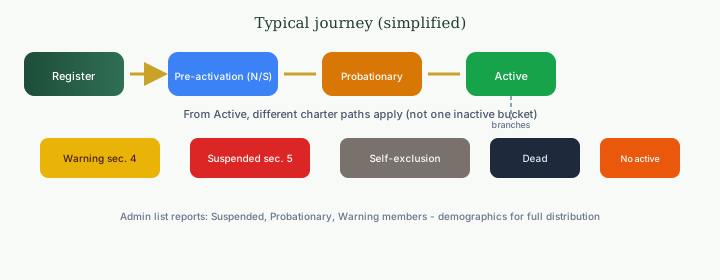
Imagine a single thread that runs from the moment you first say “yes” to CAS-UK through every campaign season that follows. Your membership is not a static badge—it is a living status in the national record, telling your Group Admin and the systems behind the portal exactly how you stand relative to the charter today: welcomed, preparing, participating, pausing, healing, or—in the saddest cases—remembered. That thread is deliberate: mutual support only works when everyone can see, with clarity, what kind of engagement is possible right now.

In plain terms, most adults move from registration into pre-activation (national checks and fees), then probationary onboarding, and finally active membership where you contribute and join campaigns freely. If something goes wrong—missed contributions, disciplinary action, a voluntary pause, or bereavement—the status changes again so messages, fees, and access stay fair and transparent. None of these states is “just inactive”; each one triggers different guidance on screen and different care from your chapter.

Diagram of membership journey and branches

If what you see on your dashboard does not match what you expect, start with your Group Admin—they can explain how charter rules apply to your household.

What does active mean for me?
Illustration: active membership

You are in good standing: you can take part in campaigns, use your wallet as policy allows, and your chapter can count on you within the rules of the charter.

What is pre-activation?
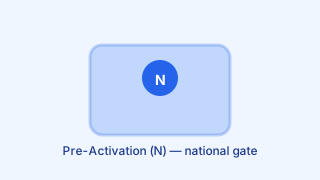
Illustration: Pre-Activation (N)

Pre-Activation (N)

You are on the national “N” path: your registration is received but you are not yet fully cleared through the activation steps (for example joining or national checks). Follow the prompts and emails until the record flips to probationary or active.

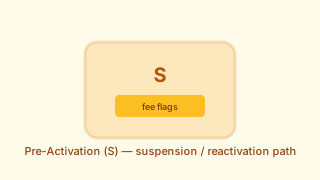
Illustration: Pre-Activation (S)

Pre-Activation (S)

You are on the “S” track after a suspension-related event: the portal may ask for a suspension fee or a reactivation fee before you return to ordinary participation. This is different from a contribution warning or a voluntary pause.

What does probationary mean?
Illustration: probationary

You are in an onboarding or re-entry window under charter section 2—learning the rhythm of contributions and chapter life before full active standing (or returning after fees). It is not the same as a disciplinary suspension.

What is a warning status?
Illustration: warning status

Usually linked to charter section 4 for missed contributions: you may see fines or prompts to bring the account back into good order. Resolve payments with guidance from your Group Admin—this path is separate from suspension.

What does suspended mean?
Illustration: suspended

Disciplinary suspension under charter section 5: participation is blocked until the process defined by policy and your chapter is completed. This is stricter than a warning or a probationary period.

What is self-exclusion?
Illustration: self-exclusion

You asked the community to pause your participation—for wellbeing or other personal reasons. It is initiated by you, not issued as discipline, and it is handled with privacy and care.

Why would a record show as dead?
Illustration: bereavement record

The national record reflects bereavement or formal closure. It is not a punishment; it protects dignity and stops automated campaign contact. Families should receive pastoral support through agreed channels—not through the wallet alone.

What does “no active parents” mean for dependants?
Illustration: no active parents

For under-18 or dependant records, the system may show this when no linked adult is currently active. Your household’s chapter can explain next steps—often a guardian must return to good standing before dependant access matches family reality.

Membership & Profile

How do I update my personal details or contact information?

Your member record is the foundation of CAS-UK mutual support: it tells your Group Admin who you are, how to reach you, and which household members are covered. Keeping legal name, address, and phone numbers current is part of your responsibility to the community. Out-of-date contact details can delay urgent campaign notices or verification. The portal is designed so most updates are self-service once you are logged in.

Membership profile and identity area in the member portal
  1. Log in via Members login and open your dashboard.
  2. Open My Profile from the main navigation.
  3. Select Edit Profile on your identity card.
  4. Save with Save Changes.

After you save, updates sync to the national record and your Group Admin can see the revised details. Some fields (for example a primary registration email) may need extra confirmation for security; if prompted, follow the on-screen steps or contact support through your usual national channel.

What are dependants and how do I add them?

Dependants are the people listed on your household membership so the community knows who is covered when campaigns and support are discussed. They are not separate payers; they sit under your primary adult record. Adding them correctly helps Group Admins and the national office verify entitlements without repeated paperwork. Campaign participation and benefits still follow the rules of active membership and national policy.

Children

Minors in your care, including adopted children, documented with name and birth year.

Elderly parents

Older relatives you support financially or physically where the scheme allows listing.

Partner

Spouse or partner formally linked to your household record when applicable.

To add someone, submit full name, birth year, and relationship. Your Group Admin checks the entry against community guidelines; once approved, the person appears as protected on your record where policy allows.

What is a Next of Kin and why should I name one?

Your Next of Kin (NOK) is the person the community can contact when formal follow-up is needed—for example if you are unreachable during an active campaign window or if bereavement and verification steps must be coordinated. Naming someone reduces delay: staff and Group Admins know immediately where to turn instead of searching through partial records. The role is about contact and advocacy for your household in line with policy, not about gifting your wallet balance by default.

Why it matters

Without a current NOK on file, confirming identity and next steps for your family can take longer while staff work through alternatives. A clear name, relationship, and phone number keeps the process humane and fast when minutes count.

Update NOK details whenever they move, change number, or you choose a different person. Wallet ownership and payouts follow separate rules; keep both your profile and NOK sections accurate.

Can someone under 18 be a Next of Kin?

You can name a young person as a Next of Kin in the sense of “who we should think of first in your family,” but minors cannot sign contracts or act as adults in financial or legal processes. CAS-UK therefore treats any under-18 NOK with extra safeguards so vulnerable people stay protected. If a distribution or formal verification is triggered, the system may require a guardian or adult trustee according to policy. The national office and Group Admins use this to avoid placing impossible expectations on a child.

Minor named as NOK

Record may be flagged for guardianship review; payouts or formal steps may route via a legal guardian or trust rules until adulthood.

Adult named as NOK

Standard contact and verification path; faster community confirmation when the person can act and respond directly.

Best practice: name a reachable adult in your region or group as primary NOK, and use minors only where policy allows and alongside guardian details if required.

How do I change my Next of Kin details?

Life changes: people move, relationships shift, and your chosen contact may no longer be the right person. Reviewing Next of Kin at least once a year—or after any major event—keeps bereavement and verification workflows smooth. The portal lets you update names, relationship, and phone without a paper form in most cases. Your Group Admin is copied so local records stay aligned with the national register.

  1. Log in to the member dashboard.
  2. Open Profile then Identity.
  3. Find Next of Kin and choose Update.
  4. Enter full name, relationship, and a reliable phone number (email too if requested).

Save and confirm any follow-up prompts. If the system flags an unusual change, support may reach out once to protect your account.

What membership types does CAS-UK offer?

CAS-UK recognises both independent adults and younger members who sit under a family record. The split keeps contributions and governance clear: adults participate in campaigns in their own right, while under-18s are protected and listed without duplicating financial responsibilities they cannot meet. National policy and your group’s rules together define exactly what each tier can do in the portal.

1. Adult member

Members aged 18+ with their own login path, wallet where applicable, and full participation in campaign rounds according to standing.

2. Under-18 member

Listed on a guardian or family record; entitled to support as policy allows, without independent campaign contribution until they transition to adult membership.

Account standing is shown as Active, Suspended (often for unpaid contributions or fees), or Deactivated when the record is closed.

Can I upload a profile photo?

Yes. Uploading a profile photo is optional but valuable: it helps Group Admins confirm they are speaking to the right person at events, on verification calls, and when unlocking sensitive account actions. The image is not a social feed avatar; it is a practical recognition tool inside trusted member tools.

Use a recent head-and-shoulders shot with neutral lighting so your face is easy to match to ID if needed. Avoid heavy filters or group shots where you are hard to pick out.

Member profile area for photo upload
  • Recognition at events — admins can confirm you quickly when distributing materials or checking attendance.
  • Account recovery — supports identity checks when you reset credentials or update sensitive fields.
  • Human connection — puts a face to the name in internal tools that staff and GAs use daily.

Use JPG or PNG; roughly square images around 500×500 pixels work well. Upload under ProfileEdit Identity.

How do I manage my notification preferences?

You choose how CAS-UK reaches you for routine updates, while certain messages must always get through so the mutual support model works. Email suits summaries and receipts; SMS and similar channels suit short, time-sensitive notices. Balancing preference with obligation keeps both you and the wider community protected. The settings screen explains which toggles are optional and which are fixed by policy.

Email

Summaries, receipts, newsletters where enabled, and security notices.

SMS / instant channels

Urgent campaign windows, deadlines, and one-time verification codes (OTA) where configured.

Open ProfileCommunication Settings. Marketing or feedback emails may be optional; campaign and security alerts typically stay on for active members with entitlements.

What does my member dashboard show?

After you sign in, the dashboard is your home base: it pulls together money movement, campaign duty, and admin messages so you are not hunting through menus during a busy week. It is designed for quick scanning on a phone or laptop. Tiles and summaries vary slightly as the system evolves, but the intent is always the same—status first, detail one click away. New members should spend a few minutes here after first login to orient themselves.

Typical at-a-glance areas

  • Wallet balance and shortcuts to top-up or pay.
  • Active or upcoming campaign rounds.
  • Recent contributions and fees.
  • Alerts for suspension risk or overdue items.

Use the dashboard daily during active campaigns; open linked sections for full history or documents.

Can I see my full contribution history?

Yes. Every campaign payment you make is logged against your member ID with enough detail for both transparency and year-end review. You can use this history to reconcile bank or card statements, to share with an accountant, or simply to see your long-term support for the community. The list is tied to your login and updates as new rounds close.

Where: Wallet or Contributions area in the member portal (wording may match your build).

What you see: campaign reference, amount, date, and method where recorded.

Download or export annual summaries if your screen offers it; otherwise use the on-screen list as your primary audit trail.

What happens if my membership is suspended?

Suspension protects the pool: if contributions or mandatory fees slip, the system flags your account so everyone understands you are not in full standing until balances are cleared. While suspended, entitlement to mutual support and some portal features may be limited according to national rules. This is reversible in most cases once you pay what is owed and any prescribed fine or reactivation fee. Your Group Admin sees the same status and can explain what applies to your chapter.

  1. Review outstanding amounts on the dashboard or wallet.
  2. Pay campaign arrears, fees, and reactivation charges if shown.
  3. Confirm status returns to Active; contact your GA if the flag stays on after payment.

Act quickly: long gaps can increase backfill or affect campaign eligibility.

Can I transfer my membership to another group?

People move city, change jobs, or align with a different chapter; CAS-UK allows transfers when both sides and the national office agree. Your member number and financial history stay on your record—only the chapter assignment changes. Neither you nor a GA should “silently” hop groups without following the official path, or reporting and support lines break.

Typical flow

  • 1Speak to your current Group Admin.
  • 2The receiving GA confirms they can accept you.
  • 3National office records the move when requirements are met.

Use Members login after confirmation to see your updated group name on the dashboard.

How do I renew my membership each year?

Annual renewal is the membership upkeep that keeps your portal, alerts, and standing in sync for another year. It is separate from bereavement campaign contributions but equally important: lapsed renewal can trigger warnings, late fees, or suspension paths depending on national rules at the time.

You will usually see reminders across email, SMS, Telegram, and in-portal banners as the window opens. Treat the first notice as your cue to pay—not the last day before the deadline.

Fees, renewal, and account standing

Typical renewal flow

  1. Log in and open the renewal or wallet banner on your dashboard.
  2. Pay the stated amount with card, PayPal, mobile money, or wallet balance if enabled.
  3. Refresh or wait for confirmation; your status should show renewed for the new cycle.

If dates are unclear, ask your Group Admin or check Wallet after login for outstanding renewal lines.

What does "active," "suspended," and "deactivated" mean for my account?

These labels are the quickest way to see whether you can rely on full mutual support and portal access. They are not decorative: they drive reminders, campaign eligibility, and what your Group Admin can see at a glance. Understanding them helps you fix problems before they become long backfills or lost entitlements. When in doubt, the dashboard usually shows the same word in the same place as national reports.

Active

Fees and campaign obligations in order; full participation as policy allows.

Suspended

Something is overdue or blocked; benefits may be limited until you clear balances.

Deactivated

Membership closed—by you or by admin—record not active in the live pool.

Your Group Admin can explain the exact reason for your status and the shortest path back to Active.

How do I cancel or withdraw my membership?

Leaving the community is a serious step: it affects your coverage, your wallet balance, and how long records are retained under law. We ask you to start with conversation—your Group Admin knows local context and can coordinate with the national office so nothing is left half-finished. You may need to settle outstanding campaign backfill, fees, or fines before a clean exit. The process is human-led on purpose, so families are not left in ambiguity.

Before you go

  • Confirm zero balance or agreed refund path for wallet funds.
  • Download any receipts or history you need for your records.

Contact your Group Admin or the national office to begin. Personal data is processed as described in our Privacy Policy.

Groups

What is a CAS-UK group?

A group—often called a chapter—is your local circle inside the national CAS-UK family. National systems handle money and records at scale, but mutual support only works when people know who they stand beside. Your group is where vetting, reminders, and human contact concentrate. Campaigns still pool nationally, yet your GA and chapter mates are the faces you see first on the journey.

Groups and chapters structure

What a chapter does

  • Led by a Group Administrator (GA) who aligns local practice with national policy.
  • Provides accountability so support is never anonymous bureaucracy.

When you contribute, you do so as part of that chapter’s roster while still participating in the wider community.

What does a Group Admin do?

The Group Admin (GA) is the human face of CAS-UK in your chapter: they welcome new members, keep the roster accurate, and make sure national policy is explained in plain language. They cannot rewrite national rules, but they can translate deadlines, fees, and campaigns into pastoral action for your group.

Think of the GA as a steward—watching contribution health, sending reminders before fines bite, and escalating hardship or disputes through official channels. They are not the national finance team, but they see enough to keep the chapter honest and kind.

Groups, chapters, and Group Admin context

Onboarding: approve or route new registrations and keep household data current.

Campaign health: see who is clear, who needs a nudge, and when to escalate.

Communication: broadcast chapter notices and answer “what do I do next?”

GAs use Group Admin login; members use Members login for their own wallet and profile.

What can I see on the Group Admin dashboard?

The GA dashboard is built for oversight without drowning you in noise: membership lists, money-in and money-out signals, and recent actions appear together so you can prioritise who needs a call today versus who is fine. It reflects what the national system knows about your chapter, so keeping your own notes aligned with the portal avoids mixed messages. Layouts can evolve between releases, but the purpose stays constant—spot risk early, celebrate compliance, communicate fast.

People

Roster, statuses, and follow-up flags.

Money & activity

Group wallet, fees, campaign progress, recent events.

Messaging tools let you reach one member or broadcast to the chapter when the system allows.

How does a Group Admin add a new member?

New people arrive either by public registration that names your chapter or by direct outreach where the GA creates or completes a record. In both cases the GA must align what they see with national requirements—identity, consent, and fee state—before the member is truly live. Duplicates and half-finished applications are more common than anyone likes, so the portal usually offers both “create” and “approve pending” paths.

Member profile context for group assignment
  1. Open the GA portal and find Add member or Pending applications.
  2. Enter or verify details; assign the correct chapter.
  3. Submit or approve so the national record updates.

If someone already registered with your group ID, you may only need to approve rather than retype data.

What is a group wallet?

The group wallet is chapter-level money: pooled fees, transfers, or other group income that belongs to the unit as a whole, not to one private member balance. It is separate from each person’s personal CAS-UK wallet so reporting stays clear for audits and for trust. GAs typically see balance and movements relevant to chapter operations; national controls still apply for large transfers.

Group wallet

Chapter pool for shared operations and tracked group transactions.

Member wallet

Individual top-ups and contributions for that member only.

Use the GA view to reconcile what the chapter holds versus what individual members still owe personally.

How can a Group Admin send notifications to group members?

Clear communication is a GA’s superpower: the same campaign can fail if half the chapter never sees the message. The portal connects to channels your organisation has enabled—email, SMS, Telegram, or similar—so you are not relying on one person’s private inbox. Use broadcasts for deadlines and targeted messages for individual follow-up. Always align wording with national guidance when money or legal obligations are involved.

  • Broadcasts — chapter-wide reminders for campaigns, renewals, meetings.
  • Direct — one member who needs a private nudge.

Available channels depend on system configuration; if something is greyed out, ask national support to enable it for your chapter.

Can I see live contribution status for my group?

Yes—for active campaigns the GA view is updated as members pay, so you can see who still owes and how the chapter is tracking against the national target. That visibility is what keeps gentle reminders fair: nobody is guessing from a spreadsheet. Latency is usually small, but card or mobile-money settlement can occasionally lag a few minutes. Use the dashboard as the source of truth before calling someone twice.

What you typically see

Per-member paid status, totals for the round, and time left before deadlines.

Pair live data with pastoral follow-up—technology shows who; people still decide how to help.

How many members can a group have?

Chapter size varies by city, culture, and how many families want a GA who can still know them by name. CAS-UK does not publish one universal cap for every region; instead, national guidance keeps groups small enough for pastoral care and large enough to be sustainable.

When a chapter grows fast, the national office may help split or merge boundaries so no single leader is overwhelmed. Splits and mergers are coordinated so wallets, campaigns, and member records stay clean.

Chapter size and structure

Smaller chapters

Tighter circles, faster trust; may merge with neighbours if below viable size.

Larger chapters

More capacity; may need deputies or a planned split when pastoral load spikes.

Ask your Group Admin or the national office if you are unsure whether your chapter should grow, split, or merge—do not guess from chat rumours.

Can a group have more than one Group Admin?

Yes, but with clear roles. One Primary GA holds ultimate accountability for the chapter record and high-impact actions. Assistants or deputies can help with day-to-day workload—payments, reminders, member queries—without fragmenting authority. That split keeps continuity when someone travels, falls ill, or steps back temporarily. National permissions still define what each role can click.

Primary GA

Full responsibility; approves major moves and chapter-level money.

Assistant / trustee

Limited tools for speed; sensitive actions may need primary approval.

Exact limits are enforced in software—if a button is missing, the primary GA is not being bypassed by mistake.

What if I am not happy with my Group Admin?

Friction with a GA can be painful because they stand between you and smooth support. Most issues start as miscommunication—deadlines, tone, or workload—not misconduct. Start with a direct, respectful conversation through the normal chapter channels. If trust cannot be repaired, you can request a transfer rather than staying silent. Serious concerns about money or safety should go to the national office promptly.

  1. Direct resolution — use My Group links or agreed contact paths.
  2. Transfer request — ask to move chapter if fit is wrong.
  3. National escalation — email admin@cas-uk.org for ethics or financial worries.

Investigations are handled with discretion; bring facts and dates where you can.

How do I find out which group I belong to?

Your chapter name and identifier live on your member dashboard once assignment is complete—no need to hunt through old emails unless you enjoy archaeology. The same block usually shows your GA contact path when the system has one on file. If you joined through a national intake queue, assignment can lag a few days while routing is decided. Pending members may see a placeholder until the registrar locks the chapter.

Where to look

Dashboard header or My Group card after login—group name and ID (for example North London Unity-05).

If you are still pending, wait for the email that names your GA or message national support with your registration reference.

Can I view a list of all groups?

You can browse high-level chapter information—the public directory is meant to help people find a region or name, not to expose private rosters. Member names stay inside the authenticated chapter view for obvious privacy reasons. That separation is deliberate: strangers should not map your household from a web search. If you need a contact for a chapter, start from the directory and follow official links.

Open the group directory for public chapter names and locations.

Privacy wall

Only your own chapter dashboard lists fellow members you are entitled to see.

What happens to members if a group is dissolved?

Dissolving a chapter is rare but planned for: leadership gaps, migration, or sustained inability to meet governance standards can trigger national intervention. The goal is never to punish members for admin failure. Instead, registrars stabilise accounts, preserve money trails, and re-home people into healthy chapters. You may experience short-term uncertainty, but entitlements tied to your record follow you—not the old letterhead.

  • Temporary national holding chapter while matches are found.
  • Wallet, history, and standing move with your member ID.

Watch for email from the national office with your next GA contact—respond so reassignment stays fast.

How does a Group Admin track outstanding fees for the group?

GAs rely on live status views—sometimes described as a financial heatmap—that colour who is clear, who is drifting toward overdue, and who is already in warning territory. That single glance replaces guesswork before campaign deadlines hit. The tool updates as members pay, so you can prioritise pastoral calls instead of mass nagging everyone equally. It pairs well with compassionate messaging: data shows who needs help, not who deserves shame.

Clear — paid up for the current obligations.
Watch — approaching deadline or partial payment.
Risk — overdue; suspension may follow.

Send system reminders where available, then follow up personally when someone is in the risk band.

Can groups hold meetings through the CAS-UK system?

The portal is strongest at money, records, and broadcast messaging—not at replacing Zoom or a village hall. Chapter meetings themselves still happen where humans gather: homes, halls, or video links your group chooses. CAS-UK helps by announcing dates, sharing links in broadcasts, and keeping rosters accurate so the right people get the invite. Think of the system as logistics and transparency, not the meeting room itself.

Groups meeting and chapter coordination

In-portal

Chapter broadcast for agendas, deadlines, meeting reminders.

Off-portal

WhatsApp, Telegram, or other hubs your chapter agrees to use.

Check My Group on your dashboard for curated links your GA publishes.

Campaigns & Contributions

What is a CAS-UK campaign?

A campaign is the active phase of our mutual support promise: the national office and Group Admins verify a bereavement, then every eligible member is called to contribute on fixed terms. It turns abstract membership into concrete help for a named family. The process is time-bound and audited so dignity and fairness stay intact. Until you have lived through one, it can sound administrative—but for the family receiving support, it is the community showing up.

Campaigns and contributions flow

In simple terms

Verified event → call to contribute → pooled funds → disbursement to the family according to policy.

Amounts are fixed per round so fairness is visible to everyone; see the next question for how those figures are communicated.

How much do I have to contribute to each campaign?

Everyone pays the same fixed amount for a round so there is no guesswork, no social comparison, and no haggling in a crisis. National leadership sets the figure for each campaign based on policy and need; it may differ from one round to the next. You always see the number before you pay, in writing and on the payment screen. Optional extra gifts may exist separately—see the dedicated FAQ below.

Standard round

Fixed amount announced in advance (historically often in the £15–£30 range—always follow the live notice).

Special calls

Occasional hardship or exceptional rounds—same transparency rules apply.

Check SMS, email, and dashboard banners for the authoritative figure for that launch.

How do I make my contribution?

When a round opens, paying should feel fast even on a phone at work or on the school run. The portal offers parallel paths so you are never stuck if one channel hiccups. Wallet pay is ideal if you already topped up; card checkout covers people who prefer pay-as-you-go; secure email links help when you are away from saved passwords. Pick what matches your habits—timeliness matters more than method.

Campaign contribution payment options
  1. Wallet — deduct from your CAS-UK balance when funds cover the round.
  2. Card — pay through the integrated checkout (Stripe) on the contribution page.
  3. Secure link — use the session-aware link from campaign email when provided.

Before you pay

Confirm the campaign name and amount on screen match the national notice; screenshot confirmation for your records.

Start from your dashboard after signing in so you see the live round tied to your member ID.

What are "live contributions" on the website?

The live wall is a public-facing pulse of the round: as members pay, anonymised or display names can appear in a stream so everyone sees momentum building. It is part psychology—grief isolates, but visible solidarity reassures—and part logistics, because stragglers realise the community is moving without them needing a private nudge yet. The effect is strongest in the first hours after launch. Not every build shows the same animation, but the intent is consistent.

Payments and wallet context for campaigns

“Watching names tick in reminds a family that hundreds of households are standing with them—not as spectators, but as contributors.”

Only display names appear on the wall, never full legal identities—see your profile settings for the label others see.

Where can I view my contribution history?

Your contribution ledger is the proof of your faithfulness to the pool: every cleared round should appear with campaign reference, amount, and time. You will use this for personal accounting, for employer matching schemes if applicable, or simply for peace of mind. The UI may label the area Wallet, Contributions, or Audit Log depending on release—follow the money icons after login.

Wallet and contribution history
  1. Sign in via Members login.
  2. Open Wallet or Contributions from the dashboard.
  3. Choose your personal audit log or transaction list; filter by campaign ID or date if available.

Download annual summaries when offered; otherwise export or screenshot for your records.

What happens if I miss a contribution deadline?

Deadlines exist so families receive support on time and the pool stays predictable. Missing one hurts everyone—not emotionally only, but practically, because totals and follow-up work balloon. The system therefore escalates in clear stages: reminders first, costs next if needed, then standing. Exact amounts follow live policy; treat SMS and dashboard notices as authoritative for your account.

  • Stage 1

    Reminder — overdue warning with a short window to pay.

  • Stage 2

    Late fee — administrative charge added to the contribution (example values appear in-system).

  • Stage 3

    Suspension risk — continued non-payment can suspend benefits until cleared.

Pay as soon as you see the flag; your Group Admin can confirm the fastest path if you are stuck.

Can I contribute more than the required amount?

The fixed round keeps parity: nobody negotiates during grief. Separately, generosity still has a home—many members add an optional amount on top when the checkout offers it. That extra typically routes to the family payout path described on screen, recorded distinctly from the mandatory round. It should never be confused with skipping the standard amount; both lines can appear on your receipt.

How to add more

During payment, look for an optional gift or top-up field and enter the additional value before confirming.

Keep screenshots of confirmation emails for your own records.

How does auto-debit work for contributions?

Auto-debit (sometimes labelled auto-support) pairs with a funded wallet: when a campaign opens, the system attempts to deduct your fixed share immediately so you never enter the “I forgot” zone. It is the difference between intending to help and actually clearing the bar in the first minutes. You still get a receipt for each automated movement. If the balance is short, nothing is taken and you must top up or pay manually.

Target: record your contribution in the opening minutes of a launch when funds cover the round.

Toggle the option in wallet or payment settings; disable any time if you prefer manual control.

What is a missed contribution backfill?

Backfill is the catch-up total for campaign rounds you missed while inactive, suspended, or otherwise unable to pay. It is not a punishment label—it is arithmetic so your standing matches what the community would have expected across those rounds. Until backfill is addressed, you may remain outside full protection. The system calculates the figure so you are not negotiating guesses with a spreadsheet.

One-off clearance

Pay the full computed backfill in a single settlement when you can.

Instalments

Ask national support about staged plans (for example over several weeks) for large arrears.

Returning to active status restores your household’s eligibility path once everything is cleared per policy.

How long does a campaign stay open?

Campaign windows are short on purpose: families need certainty, and the community needs a fair cut-off for totals and fines. Many rounds follow a roughly 72-hour rhythm—announce, remind, close—though always follow the live countdown on your dashboard. After sealing, finance teams reconcile and move to payout; late payments may still be accepted but can carry penalties. Treat the published end time as firm unless national messaging extends it.

  • Day 1 — launch and first wave of payments.
  • Day 2 — reminders to members who are outstanding.
  • Day 3 — final push and preparation to seal.

Late payments after seal may be marked separately—pay inside the window whenever possible.

Who decides when a campaign is created?

No single volunteer can open a national round on a whim. Creation requires aligned facts: the family’s report, local verification, and national authorisation. That triangle protects grieving people from gossip and protects the fund from fraud. Each side can pause the process if something does not add up—patience is part of integrity. Only after clearance does the launch button affect every member’s wallet.

  1. Family report — official bereavement form from Next of Kin or authorised person.
  2. Group Admin — local confirmation grounded in community knowledge.
  3. National registrar — document review and authorised launch.

If any stage raises questions, work pauses until they are resolved—never rush verification.

Can I see how much has been raised for a campaign so far?

Yes. During an open round your dashboard should show progress toward the community target—totals, participation rate, and time remaining—so you are not guessing whether the family will be fully supported. Refresh intervals are tuned for accuracy without hammering the servers; figures may tick every few seconds in busy periods. Transparency keeps trust high when emotions are raw.

Total raised Participation % Countdown

If numbers look stuck after you paid, wait a minute for gateway confirmation before retrying.

What happens to the money collected from a campaign?

After sealing, money is not sitting idle in a vague pot—it follows an audit and disbursement path so every incoming payment matches an outgoing authorisation. Internal wallet movements and external card batches are reconciled first. National trustees or authorised signatories then approve the final payout figure. Only then do funds reach the family by agreed rails—usually bank transfer—sometimes paired with an in-person handover where culture and safety allow.

  • Reconcile — match all captured payments to the campaign.
  • Approve — national sign-off on the disbursement amount.
  • Pay out — transfer to the family or designated beneficiary.

Exact timelines depend on banking cut-offs; families receive communication from authorised staff, not random requests.

Am I notified when a new campaign is announced?

You should not learn about a campaign only by accident. Launches trigger a multi-channel sequence so inboxes, phones, and dashboards align—email for detail, SMS or instant channels for urgency, in-app badges for those already logged in. The order may shift slightly by configuration, but redundancy is intentional: one missed channel should not mean one missed payment. Keep notification preferences current so nothing silently fails.

Typical launch sequence

  • T0 Email with secure payment context.
  • T+1m SMS or Telegram broadcast where enabled.
  • T+5m Dashboard alert or badge for active sessions.

If you receive none of these, check spam folders and phone signal—then contact support before the deadline passes.

What payment methods are accepted for contributions?

Contributions need to work for people on cards, on PayPal, on mobile money, and for members who pre-funded a wallet. Not every rail is available for every person—regional banking rules apply—but the checkout only shows what you can use today. Card data is handled by certified providers; CAS-UK does not store full card numbers on its own servers. Always complete payment inside the official portal or linked checkout.

Stripe card
PayPal
Mobile money
Bank transfer
CAS wallet

If a method fails twice, try another rail or contact support with the error text—screenshots help engineers trace gateway issues.

Wallet & Payments

What is the CAS-UK wallet?

The CAS-UK wallet is your prepaid balance inside the member portal: money you can draw on for campaign rounds, fees, and other eligible payments without re-entering card details each time. It exists to reduce friction when grief and deadlines collide—one less excuse to miss the window. The balance is yours in the sense of spendable credit for CAS-UK purposes, governed by the same refund and AML rules as other top-ups. Think of it as a dedicated sub-account for community obligations, not a bank account with arbitrary interest.

Wallet and payments overview

What a funded wallet helps with

  • Instant campaign deduction when auto-debit is on.
  • One statement trail for top-ups and spend.

Top up before busy periods if you prefer not to rely on card gateways during a launch.

How do I top up my wallet?

Topping up sends fresh money from your bank or card provider into your CAS-UK wallet through the same trusted gateways as campaign checkout. Pick an amount that covers a few rounds plus fees so you are not topping up weekly. The flow stays inside the authenticated portal—never pay “wallet top-up” to a personal account someone messages you on WhatsApp.

  • Step 1: Open Top-up wallet from the dashboard.
  • Step 2: Enter amount (common presets appear on screen).
  • Step 3: Complete card, PayPal, or mobile money; balance updates after confirmation.

Keep screenshots of confirmation until the new balance matches.

Where can I check my wallet balance?

Your available balance is shown in the member header or profile card so you do not need to dig into accounting menus to know whether you can cover the next round. That visibility is intentional: shame and surprise are not the tools we use—clarity is. Tapping the balance usually opens the wallet audit trail with every line item dated and labelled. If you ever see a mismatch, compare against your bank before opening a ticket.

Typical line labels

Manual top-up, campaign deduction, renewal fee, fine, adjustment—each entry should show amount and timestamp.

Refresh after a payment if the balance appears stale; gateways occasionally confirm a few seconds later.

Will I receive reminders if my wallet balance is low?

Yes. A low-balance warning exists so auto-debit users are not caught empty-handed when a campaign launches at midnight. Thresholds and channels are configured in the system—email, SMS, or Telegram depending on your notification setup. The alert is not a moral judgement; it is a mechanical nudge. If you intentionally run a zero balance, disable auto-debit or ignore the ping at your own risk.

Example threshold: alerts may fire when balance falls below roughly £25—check live notices for the exact number.

Reload early in the week so you are not scrambling during work hours when a round opens.

What is auto-debit and how do I enable it?

Wallet auto-debit (or auto-support) watches for new campaign launches and tries to pay your fixed share from your balance as soon as the round opens. That automation is how busy members stay consistent without heroics. It is not magic: if the balance is short, nothing posts and you must pay manually or top up. You still receive a receipt for each successful deduction. Toggle it in payment or wallet settings when your life rhythm changes.

  1. Fund the wallet above your usual campaign amount.
  2. Enable auto-debit in SettingsPayment preferences (wording may vary).
  3. Watch for low-balance alerts before launches.

Disable auto-debit before long travel if you cannot monitor top-ups.

What payment methods can I use to top up?

Top-ups use the same gateway families as campaign checkout: Stripe for most cards, PayPal where enabled, and mobile-money integrations in supported regions. The checkout adapts to what your bank and CAS-UK have activated—if a method is missing, it is not a bug on your phone, it is usually a regional limitation. You should complete every top-up inside the official flow so protections apply.

Wallet top-up payment methods
Stripe cards
PayPal
Mobile money

Never share OTPs or verification codes with anyone claiming to be a volunteer.

Is it safe to store money in the CAS-UK wallet?

Storing value in the wallet is a convenience choice, not a speculative investment. CAS-UK treats pooled funds with regulated seriousness: card data stays with payment processors, not in plain text on our servers, and balances are ring-fenced for member obligations rather than mixed with day-to-day office snacks. No online system is risk-free, but we follow industry-standard practices and audit trails. If you are uncomfortable holding a balance, pay each campaign manually instead.

Secure login and payments
  • Tokens, not raw cards — Stripe and peers keep card numbers off our disks.
  • Segregated handling — member wallet pools are accounted separately from operational budgets.

Report suspicious messages immediately; staff will never ask for your password in full.

Can I get a refund from my wallet?

Yes, in principle you can withdraw unused wallet balance when you leave or no longer want funds on deposit, subject to AML and fraud checks. The national registrar must verify identity and source of funds before sending money back—this protects everyone from stolen-card top-offs. Refunds are not handed out in cash to random messengers; they follow banking rails.

AML rule

Refunds return to the original card or PayPal account that made the top-up whenever possible.

Email the national office with your member ID and reason; expect a short processing window.

What happens if my wallet does not have enough to cover a contribution?

The system will not invent money: if auto-debit runs and your balance is short, the deduction simply does not happen. You remain responsible for paying the campaign another way before the deadline. That is why low-balance alerts exist—so you can top up before launch, not after. Waiting until the last minute still works, but it adds stress.

What to do

Top up, or open the campaign checkout and pay by card/PayPal directly. Watch for notifications about the failed auto attempt.

Do not assume silence means success—confirm the contribution appears in history.

Can I view a transaction history for my wallet?

The wallet ledger is your audit trail: every top-up, spend, fee, and adjustment should appear with a timestamp and human-readable label. That transparency is how you reconcile against bank statements and how staff resolve disputes without guessing. Export or screenshot periodically if you need offline evidence. If a line looks wrong, note the transaction ID before contacting support.

  • Credits — top-ups and refunds in.
  • Debits — campaigns, fees, fines.

Open the wallet area from the dashboard after logging in.

Are there any fees for topping up my wallet?

CAS-UK does not add a separate “wallet tax” on top of every load for ordinary member use. You may still see processor fees from Stripe, PayPal, or mobile money—these are industry standard and vary by card type and country. The checkout screen should break out net credit versus fees before you confirm. Comparing two methods on a small test top-up can save you money.

CAS-UK — no extra internal fee for typical top-ups.
Processors — may take their percentage as shown at checkout.

Keep receipts for cross-border cards where FX spreads apply.

How quickly does a wallet top-up appear in my balance?

Card and PayPal flows usually credit your wallet within seconds of the provider returning success—fast enough for a campaign that closes the same evening. Mobile money can lag when telco networks batch confirmations; wait five minutes before trying again to avoid double charges. If a status stays pending, screenshot the provider message and open a ticket with timestamps.

Stripe / PayPal — typically immediate.
Mobile money — often minutes, occasionally longer at peak times.

Refresh the dashboard after paying; do not close the browser until you see confirmation.

Can I use my wallet to pay fees and fines as well?

Yes. A healthy wallet is a single pool you can draw against for anything the portal allows—campaigns, joining or renewal fees, administrative fines, and some donations where configured. That consolidation reduces “I paid here but not there” confusion. Each spend still leaves a ledger line so you can audit later. If a payment type is greyed out, national rules may require a different rail.

Community support — campaign contributions.
Membership — fees, renewals, fines.

Keep surplus balance for busy months; draw down before closing if you exit.

Can my Group Admin see my wallet balance?

Group Admins need to know whether you are meeting obligations—paid, pending, or overdue—without seeing every private financial detail. That is why dashboards emphasise status rather than raw wallet balance. National staff retain tools for deeper review when fraud or AML concerns arise. Your chapter leader should never demand your OTP or bank password to “check” your wallet.

GA view: typically contribution and fee status, not arbitrary balance peeking.

National view: oversight for compliance and support tickets.

Report anyone pressuring you to expose credentials.

What currency does the wallet use?

The member wallet is denominated in British Pounds Sterling (GBP) so national totals, fines, and campaign maths stay consistent. If your bank account is in another currency, your card issuer converts at their rate before CAS-UK receives GBP—check your statement for the exact FX and fees. Do not mentally convert at airport rates; use the amount posted.

Travelling or living abroad?

You can still top up; conversion happens at your provider.

For large moves, plan ahead so currency swings do not affect your ability to contribute on time.

Fees & Fines

What is the joining fee?

The joining fee is your one-time investment in becoming part of CAS-UK’s verified mutual-support circle. It pays for identity checks, assigning your Group Admin, and issuing your secure digital identity so the community can trust who is in the fund. Without that upfront work, the safety net would be easy to game and expensive to police. The amount is set nationally and communicated before you complete registration. Treat it as the administrative cost of entering a covenant that depends on everyone showing up reliably.

Fees and fines overview illustration

What the joining fee typically covers

  • Verification of your details and household linkage
  • Secure onboarding and access to the member portal
  • Placement with the right group and Group Admin context

If you are unsure whether you have already paid, check your wallet and account statement or ask your Group Admin before making a second payment.

What happens if I miss a contribution?

In CAS-UK, reliability keeps the pool healthy for every family who may need it tomorrow. When a campaign closes and your share is still unpaid, the system records a late support position and may apply a late support fine under national rules. That fine is not a punishment for its own sake; it funds the extra work to reconcile accounts, chase payments, and protect members who paid on time. Your Group Admin and the national office can explain the exact amount and how it appears on your statement. Acting quickly keeps your standing clear and avoids suspension.

If a fine sits open

You may be marked suspended until balances are cleared, which can affect entitlements under policy.

When you clear it

Your record returns to good standing and you stay fully inside the community safety net.

Critical: always clear fines promptly. If you are in hardship, speak to your Group Admin early—silence costs more than an honest conversation.

What is the suspension fee?

If your account is inactive beyond the threshold (often around sixty days), CAS-UK may move you to suspended status to protect active members and the integrity of campaigns. Bringing you back requires staff and Group Admin time to confirm you are still eligible and to reconcile anything missed while you were away. The suspension or re-entry fee covers that risk-assessment work and the administrative cost of reactivating your access. It is separate from any missed contributions or fines, which must also be settled. National policy sets the amount; your Group Admin will quote the current figure.

Typical steps before you are fully active again

  1. Confirm identity and contact details with your Group Admin.
  2. Pay the suspension or re-entry fee where applicable.
  3. Clear missed contributions and any fines tied to the gap.

Ask for a written breakdown of what is owed so you can pay in the right order and avoid repeated suspension.

How do I reactivate a suspended membership?

Reactivation is a structured path, not a single click. You must clear every open item: missed contributions, any late fines, suspension or re-entry fees, and the reactivation fee where applicable. Your Group Admin is your first stop—they can pull a consolidated statement and explain the sequence national policy expects. Paying in the wrong order can leave you stuck in a half-cleared state, so ask for written confirmation of what each payment covers. Once everything is settled, your membership returns to active status and full participation.

1

Confirm your contact details and identity with your Group Admin.

2

Pay outstanding campaign amounts, fines, and suspension-related fees.

3

Complete reactivation payment and confirm your dashboard shows active status.

Keep a copy of receipts or confirmations for each step so you can resolve any mismatch quickly with the national office.

What is the reactivation fee?

The reactivation fee covers the administrative work to put a suspended member back into good standing: updating records, restoring portal access, and confirming that policy rules are satisfied. It is separate from paying off missed contributions or fines, which address past campaigns. National office sets the current amount; your Group Admin will quote it and tell you how to pay. Think of it as the closing cost of reopening your membership after a pause. Always ask for the fee schedule in writing if you are comparing quotes from different conversations.

Secure account access and member portal context

Reactivation fee

Covers admin to restore access and verify your record after suspension.

Campaign arrears

Separate lines for missed contributions and any fines—settle both for full standing.

If you believe the fee was applied in error, raise it through your Group Admin first, then escalate via the contact page with dates and screenshots.

How is the backlog calculated if I have missed several campaigns?

Your backlog is the sum of every missed campaign contribution in sequence, plus any fines or late fees that were triggered while those amounts stayed open. The platform keeps a line-by-line history so you can see which period each line belongs to. That transparency matters when you are negotiating a catch-up plan with your Group Admin. National rules may add charges for late payment or administration; those appear as separate line items. Always request a printed or PDF-style breakdown before you pay large sums.

Usually included in a backlog total

  • Per-campaign contribution amounts you did not pay before the seal
  • Late support or administrative fines tied to those periods
  • Suspension or re-entry fees if you were inactive across the gap

If a line does not make sense, query it before paying—corrections are easier before money moves.

Is there an annual membership renewal fee?

Yes. CAS-UK runs on reliable infrastructure: SMS delivery, hosting, security reviews, and the support systems that keep your account safe. The annual maintenance renewal is the modest fee that keeps that engine running. It is not the same as campaign contributions; it is the membership upkeep that keeps your portal, alerts, and verification channels alive. Notices appear on your dashboard ahead of expiry so you can plan. If you let renewal lapse, you may move into pending deactivation, which pauses your household safety net until you catch up.

Renew on time

Avoid extra late renewal fees and keep uninterrupted access.

If you are late

The system may add a late renewal fee on top of the standard renewal.

Set a calendar reminder when your dashboard shows the thirty-day notice so renewal never surprises you.

Can I pay fees in instalments?

The platform does not automatically split every balance into instalments, because campaign timing must stay fair for everyone. In genuine hardship, your Group Admin and the national office may agree a manual plan that fits your situation and policy. That conversation works best when you bring specifics: what you can pay now, what you can pay weekly, and any supporting context. CAS-UK is built on mutual care, but commitments must be clear so the pool stays protected.

Before you ask for a plan

Gather your latest account statement, list proposed dates for each payment, and confirm you understand any fines still accruing until the balance is zero.

Never promise more than you can deliver; a smaller honest plan beats a broken large one.

Are fine amounts the same for all groups?

Core fine rules are set nationally so members know what to expect wherever they live. Some aspects may still vary by group, region, or chapter in line with the constitution and national guidance. Your Group Admin should never be guessing—ask them for the schedule that applies to your membership and keep a copy. If you move between groups, confirm whether any regional adjustment affects you. When in doubt, the national office can confirm the authoritative numbers.

Groups and chapters structure

National vs chapter nuance

  • National core: baseline fines and late rules published for all members.
  • Chapter notes: local GA may explain regional add-ons or how notices reach you.

Comparing notes with friends in other groups is fine for context, but only your official statement and GA advice count for what you owe.

Where can I see all my outstanding fees and fines?

The clearest way to understand what you owe is your own wallet statement. It lists movements, balances, and colour cues so you can see fines and missed contributions at a glance. You do not need to guess from memory or chat threads—the system is the source of truth. If something looks wrong, screenshot the line and talk to your Group Admin before you pay. Keeping your login secure ensures you always see the latest figures.

Member profile and portal area for account context
  1. Sign in and open Wallet, then Account Statement.
  2. Red entries usually indicate outstanding fines or missed contributions.
  3. Green entries show available support balance where applicable.

Bookmark the wallet after login so you can review balances before every campaign.

What happens if I do not pay my fines?

Unpaid fines stay on your ledger and can grow the longer they remain open, because they signal risk to the whole pool. Persistent non-payment may push you into suspension, which pauses benefits and campaign participation until balances clear. The community cannot sustain a safety net without everyone honouring their obligations. If you are stuck, early engagement with your Group Admin preserves options; hiding makes the problem harder. The goal is always restoration, not exclusion—clear communication is the bridge.

Risks of leaving fines unresolved

  • Suspension and paused entitlements under policy
  • Extra administrative charges where rules allow
  • Delayed support for your household when you need the community most

Make a plan to clear the balance, even if it is in agreed steps with your GA.

Can a fine be waived or reduced?

Only the national office can waive or reduce a fine, and only when policy and evidence support an exception. Group Admins can advocate for you but cannot override national rules. If you have hospitalisation, bereavement, or another serious disruption, gather dates and documents before you write in. CAS-UK aims to be fair, not arbitrary—clear facts help the office decide quickly. Never assume silence means approval; wait for written confirmation before you stop paying.

Include member ID Include timeline Include GA reference

Submit through official channels listed on the contact page so your request is tracked.

Do under-18 members pay the same fees as adults?

Young members are part of the family safety net, but their fee structure may differ from adults because contributions and campaigns are calibrated by age and household rules. National office sets the schedule; your Group Admin applies it to your registration. Parents and guardians should confirm joining, renewal, and campaign expectations before signing up dependents. If a child transitions to adult membership, ask for the updated fee table at the same time. Consistency protects everyone from surprise gaps.

Family and under-18 registration context

Youth / dependent

Fees follow the age band and household rules on your registration.

Transition to adult

Request the adult schedule when status changes—do not assume the old rate continues.

For the latest figures, pair your GA’s guidance with your dashboard statement so nothing is left informal.

How are late renewal fees handled?

When you miss the renewal window, the system may add a late renewal fee on top of the standard renewal amount. That is why the dashboard warns you about thirty days ahead—timely payment is cheaper and simpler. Late fees are applied automatically based on the deadline recorded for your account. If you believe the deadline was wrong, raise it immediately with evidence. The best habit is to renew as soon as you see the notice.

On time

Standard renewal only.

After deadline

Standard renewal plus late fee where policy applies.

Set a phone reminder on the day the notice arrives so you never drift into the amber zone.

Where can I find the official schedule of all fees and fines?

The authoritative schedule lives with the national office and may be published in the constitution or shared as an official PDF when you request it. Your Group Admin should always have the current figures for your membership type and region. If you need a formal copy—for example for a household discussion—ask in writing through the contact route below. Keep any version you receive dated so you know it is still valid next year. When in doubt, verify before you pay.

  1. Ask your Group Admin for the schedule that matches your membership type.
  2. Request a dated PDF from the national office if you need a formal record.
  3. Compare each line to your wallet statement before paying ad-hoc amounts.

Request documents or clarifications through the contact page and copy your Group Admin on the thread.

Communications

How does CAS-UK communicate with members?

CAS-UK is built for high-trust coordination: campaigns, bereavement support, and national announcements cannot wait for someone to remember to check one inbox. That is why we layer email, SMS, Telegram, and in-portal alerts so critical news reaches you through more than one path. Each channel has a role—some carry rich context, others carry urgency or verification codes. You stay in control of optional noise, but core safety messages remain available. Treat your contact details as seriously as your wallet PIN.

Communications channels overview
Email for context, receipts, and longer updates
SMS for time-sensitive prompts and codes
Telegram bot for fast campaign alerts
Member dashboard for reminders while signed in

Update every channel in your profile so a single dead email address does not silence the whole stack.

What types of emails will I receive from CAS-UK?

Email remains the archive of your membership life: campaign calls, contribution receipts, wallet activity, renewal windows, and broadcast letters from the national office or your Group Admin. You will also see transactional mail such as password resets and security confirmations. None of this is marketing spam; it is operational correspondence tied to your obligations and benefits. If you use filters, route CAS-UK into a folder you check weekly at minimum. Keeping that habit avoids missed deadlines that become fines.

  • Campaign and governance announcements
  • Receipts and wallet or renewal reminders
  • Security and account messages

Whitelist admin@cas-uk.org so automated mail is not buried.

How does SMS messaging work?

SMS is the short, loud channel when email is too slow: campaign deadlines, reminders, and one-time passcodes for administrator verification (OTA). Messages are sent through BulkSMS using the mobile number stored on your profile. A wrong digit or an old SIM means you miss codes and deadlines, so accuracy matters. Standard UK plans usually receive these texts free; roaming members should check carrier rules. If SMS fails repeatedly, fix the number before you need it in an emergency.

Quick checklist

  1. Confirm country code (+44, +237, etc.) in profile.
  2. Test with a friend message if your SIM recently changed.
  3. Do not share OTP codes with anyone claiming to be “support.”

Your Group Admin can confirm the number on file if you are unsure.

What are push notifications and how do I enable them?

Browser push notifications let the CAS-UK site alert you while you are doing something else—similar to news or banking apps on the web. When you first visit on a supported browser, you may see a permission prompt; accepting it allows lightweight reminders without opening email. You can revoke permission anytime in browser settings if the pings feel noisy. Push complements SMS and Telegram; it does not replace them for codes. Use it if you live in your browser during work hours.

Enable: allow notifications when the site asks, then test by logging in on a campaign day.
Silence: block or reset permissions under your browser’s site settings for CAS-UK.

If you never see a prompt, check whether a corporate policy blocks web notifications on your device.

What are broadcast messages?

A broadcast is a one-to-many message from the national office or your Group Admin that keeps the whole community aligned. It is how AGMs, policy shifts, regional gatherings, and urgent reminders reach every eligible inbox without relying on gossip chains. Broadcasts may arrive by email, SMS, Telegram, or in-portal notices depending on urgency and audience. They are not personal chit-chat; they carry governance weight or operational timing you need to act on. Treat the subject line seriously and read before you delete.

Common broadcast topics

  • Annual General Meeting dates and papers
  • Regional chapter socials or cultural events
  • Governance or contribution policy updates

If you missed one, ask your Group Admin for the official copy rather than relying on screenshots in chat.

Can I control which notifications I receive?

You can tune optional channels so day-to-day noise stays low while obligations stay visible. Open SettingsNotifications in the member portal to choose which sources may ping you for non-critical items. Essential service alerts—bereavement campaigns, security resets, OTA codes—remain on because they protect you and the fund. Think of it as a seatbelt: you can adjust the radio, not remove the belt. Review settings after you change phone or email.

Note: essential alerts cannot be disabled; they are tied to membership safety and verification.

Pair notification tuning with accurate contact data so what stays enabled actually reaches you.

I am not receiving emails from CAS-UK. What should I check?

Most “missing” CAS-UK mail is sitting in Spam, Promotions, or a work quarantine you never see. Gmail, Outlook, and Yahoo all learn from what you open—if you never touch CAS-UK mail, it drifts downward. Start by safelisting admin@cas-uk.org and dragging a recent message to the primary tab. Then confirm you did not unsubscribe during a spring clean. Finally, re-read your address under ProfileIdentity; one typo routes everything into the void.

  1. Add admin@cas-uk.org to contacts or safe senders.
  2. Search all folders for “CAS-UK” before assuming failure.
  3. Verify spelling of your email in ProfileIdentity.

Still stuck? Use the contact page with a secondary address for testing.

How do I unsubscribe from SMS messages?

SMS preferences live alongside your other notification controls in the member portal. You can dial back marketing-style texts where policy allows, but campaign seals, security codes, and OTA messages may still arrive because they are not optional extras. Turning everything off would leave you blind during the moments the community most needs to reach you. If cost or timing is the issue, talk to your Group Admin before you silence the channel entirely. Document any change so you remember what you switched off.

After changing SMS settings, send yourself a test by requesting a profile save or asking GA to trigger a low-priority message.

Keep Telegram or email strong if you reduce SMS volume.

Can my Group Admin send me messages directly?

Yes. Group Admins can message individuals or entire groups from the GA portal when a human touch beats automation—think pastoral check-ins, contribution follow-ups, or last-minute venue changes. Those messages ride the same trusted infrastructure as national broadcasts: email, SMS, and Telegram. Your GA is not bypassing CAS-UK; they are using sanctioned tools. Respond promptly when contacted; delays ripple into campaign integrity. If something feels like phishing, verify through a known GA phone number before clicking unusual links.

Direct — tailored reminders or pastoral support
Group — chapter-wide updates or roll calls

Save your GA’s official contact details separately from random chat groups.

Does CAS-UK use WhatsApp for communication?

Automated CAS-UK system traffic flows through email, SMS, and Telegram because those channels integrate with verification and audit trails. WhatsApp groups sometimes spring up informally between friends in the same chapter, but they are not a substitute for official notices. Treat WhatsApp as community glue, not the canonical record. If someone forwards a “rule change” only on WhatsApp, confirm it on the portal or with your GA. Official business always lands where the system can prove delivery.

Authoritative

Portal, email, SMS, Telegram—timestamped and auditable.

Informal

Chapter chat—great for lifts and reminders, not for policy truth.

Prefer Telegram for app-style alerts tied to your CAS-UK account.

How do I update my phone number for SMS delivery?

Sign in, open your profile, and edit the mobile field with the full international format. UK members should use +44; Cameroon-linked members often use +237. Saving the profile pushes the new number to BulkSMS on the next message. Change it the same day you swap SIM cards—otherwise OTAs and campaign texts go to a stranger. If the portal rejects the format, screenshot the error and ask your GA before you retry blindly.

Phone and contact fields in member onboarding context

After updating, trigger a low-risk confirmation (such as saving profile) and watch for the success banner.

Will I be charged for receiving SMS messages from CAS-UK?

CAS-UK pays the sender cost for standard member SMS; receiving texts is usually free on inclusive UK bundles. If you travel abroad, your carrier may charge roaming rates for inbound SMS—check before you fly. We cannot credit those carrier fees, so plan ahead: use email or Telegram when roaming costs bite. Prepaid SIM users should confirm their package includes incoming texts. The goal is zero surprises when a verification code arrives.

UK home network

Inbound CAS-UK SMS is typically included in your bundle.

Roaming abroad

Carriers may charge per SMS—use Wi-Fi, email, or Telegram when costly.

When in doubt, ask your mobile provider for a written summary of inbound SMS rates.

Can I receive campaign notifications on Telegram even if I do not use email?

Yes. Once Telegram is linked, campaign pushes can reach you even if your inbox is dusty. The bot channel is independent of email preferences for many alert types, so it is ideal for members who live in messaging apps. You should still keep an email on file for formal receipts and password recovery. Pair Telegram with SMS for redundancy during bereavement rounds when seconds matter. Test the link quarterly so you know the bot is still authorised.

  • Fast alerts: campaign opens and chapter pings via the bot.
  • Formal trail: keep one email for receipts and account recovery.

If you rely on Telegram alone, ensure the app stays updated and notifications are allowed.

How do I contact the national CAS-UK office?

The national office coordinates policy, finance, and escalations that sit above your chapter. Use the official contact page for the current postal address, phone line, email, and web form. Include your member ID and Group Admin name so staff can route the ticket quickly. Avoid sharing sensitive documents through random social channels. We aim to answer every message, though peak campaign weeks may add a short delay.

Include in every enquiry

  • Member ID and legal name as on the portal
  • Group / chapter and Group Admin name
  • Short summary and any reference numbers

For urgent safety issues, follow the phone guidance on the contact page rather than waiting for email alone.

Surveys & Events

What are CAS-UK surveys?

Surveys are CAS-UK’s digital town hall: a structured way to hear the membership before big decisions land. Contribution levels, group boundaries, and support policies affect every household, so leadership asks for data instead of guessing. Each invitation explains the topic, deadline, and who may respond. Your answers feed national planning and help chapters advocate for resources. Treat surveys as seriously as campaign payments—they shape the rules you live under next year.

Surveys and community events illustration

Why surveys matter

  • They evidence member sentiment before policy changes.
  • They highlight regional needs (chapters, hardship, youth).
  • They complement—not replace—AGM votes and constitutional steps.

When a link arrives, complete it early so your voice counts before reminders pile up.

How do I participate in a survey?

Participation starts with the invitation: email, SMS, Telegram, or a dashboard banner will point you to the secure form. Open the link on a trusted device, read each question slowly, and submit once you are satisfied—rushing causes mistakes that are hard to unwind. If the link expires, request a fresh one from your Group Admin before the closing timestamp. You can usually save progress only if the tool allows; otherwise complete in one sitting. Silence is not neutrality; it cedes voice to others.

1. Open official link
2. Answer honestly
3. Submit before deadline

Check the surveys hub if you are unsure whether anything is still open.

Who is eligible to take part in surveys?

Eligibility is never a mystery: each announcement lists the audience—every active member, a single region, elders only, parents, and so on. National surveys may require good standing; chapter-specific pulses may include provisional members differently. If you are unsure whether you qualify, ask your Group Admin before you click, because duplicate or ineligible entries can be discarded. Youth or associate categories follow whatever the invitation states. When CAS-UK needs a statistically clean sample, the text will say so plainly.

Groups and chapters context for survey audiences

Check before you submit

  • Invitation says “all members” vs “region X only”
  • Good standing required (wallet and fines clear)
  • One response per member unless the form says otherwise

Keep your membership status current so you are not excluded for administrative reasons alone.

Are survey responses anonymous?

Some surveys are fully anonymous, others attach your ID for follow-up or weighting, and the preamble tells you which mode applies. CAS-UK handles responses under the Privacy Policy, with access limited to staff who need it. Never forward a personal survey link—it can deanonymise you accidentally. If you require clarification, email the office before submitting sensitive comments.

Anonymous — aggregated insights without member names in reports.
Identified — tied to your account for audit or pastoral follow-up.

Read the banner at the top of the form every time; modes can change between surveys.

Where can I see survey results?

After the closing date, the national office typically publishes a summary through broadcasts, the member portal, or a public news post—depending on sensitivity. Your Group Admin may also walk through the highlights in a chapter meeting so questions can be answered live. Raw spreadsheets are rarely shared wholesale; expect narrative plus key percentages. If you cannot find the summary, search your email for the original survey code or ask GA for the PDF. Transparency is standard, but personal free-text answers stay protected.

  1. Watch for a broadcast titled “Survey outcome” or similar.
  2. Check upcoming GA agendas for a verbal briefing.
  3. Ask the national office if you need an accessible format.

Results are most useful when paired with the context slides shared at the AGM.

What kinds of events does CAS-UK organise?

The safety net is not only financial—it is also relational. CAS-UK programmes formal governance, cultural celebration, and pastoral support so members see one another face to face. National AGMs handle budgets and leadership elections; regional dinners and festivals keep heritage alive; memorials and vigils honour families who have lost loved ones. Each tier answers a different human need. Attending even one event helps you understand why the rules exist. Your chapter calendar is the best place to see what is coming next.

  • National AGMs: Formal governance meetings where members review the communal budget and vote on board members.
  • Cultural celebrations: Regional dinners and festivals honouring shared heritage.
  • Memorial services: Collective moments of silence and support for families in bereavement.

Pair attendance with the upcoming events listing so you never miss a registration window.

How do I find out about upcoming events?

Verified events surface in the community calendar on your member dashboard and on the public upcoming events page. Major gatherings usually ship a “save the date” broadcast at least two weeks ahead via email and Telegram. Smaller chapter meet-ups may rely on Group Admin messages—so keep those channels unmuted. If you only rely on social gossip, you will miss capacity limits.

Tip: popular dinners fill quickly—RSVP as soon as the digital link opens.

Sync reminders to your calendar app when the invite includes an .ics file or date block.

How do I register for an event?

Registration paths differ: some events use a web form on the event page, others ask you to reply to your Group Admin with headcount. Read the instructions once, follow them exactly, and keep confirmation emails or screenshots. If payment or dietary requirements are involved, complete them in the same session. Late RSVPs may lose catering slots even if you are a member in good standing. When in doubt, message your GA with the event title in the subject line.

Secure portal access for event registration

Never share registration tokens in public WhatsApp groups.

Can I bring a guest to a CAS-UK event?

Guest rules vary: some galas welcome partners and children, while AGMs or closed sessions may be members-only. The invitation will spell out guest fees, ID checks, or cultural dress codes. If you bring someone without registering them, you risk turning away a friend at the door. Guests should understand CAS-UK’s values and privacy expectations—especially around photography. When in doubt, ask your GA before you promise a plus-one.

Before you RSVP “+1”

Confirm guest fee, name spelling, and dietary flags in one message to your GA.

At the venue

Carry ID if the invite says so; respect photo-free zones.

Introducing guests is encouraged when policy allows; it grows the community responsibly.

Are there events specifically for young members?

Yes. Family-friendly socials, youth panels, and mentorship evenings appear throughout the year so the next generation can learn mutual aid by experience, not only by watching parents. Announcements flag age ranges, safeguarding contacts, and whether parents must stay on site. Encourage young members to RSVP themselves when they are old enough—it builds ownership. If your chapter lacks youth programming, propose a survey topic through your Group Admin.

  • Look for age bands and “parent/guardian required” in the listing.
  • Note the named safeguarding contact on the invite—save the number.

Watch broadcasts for the word “family-friendly” or “youth” in the title.

Can I suggest an idea for a survey or event?

CAS-UK grows when members bring forward ideas grounded in real need. Pitch your survey or event concept to your Group Admin first—they can co-sponsor logistics and sanity-check timing. For national consideration, send a detailed note via the contact page with dates, audience, budget hints, and how it aligns with values. The office may fold strong ideas into the annual plan or pilot them regionally.

1. One-line problem (who is underserved?)

2. Proposed format (survey, dinner, workshop)

3. Success measure you can report back on

Include one clear outcome (“measure X” or “train Y”) so approvers can prioritise.

Will there be photos or videos from events?

Official photographers and videographers often cover major gatherings so members who could not travel still feel included. Finished media lands in the photo gallery and video gallery after editing and consent checks. Not every event is recorded—respect privacy when cameras appear. If you need a clip for personal remembrance, ask the office rather than screen-recording streams.

Photos — stills and albums, usually faster to publish.
Video — edited reels and speeches; longer post-production.

Subscribe to broadcast notices so you know when new albums drop.

How do I provide feedback after an event?

After large programmes, CAS-UK may send a follow-up survey while memories are fresh. If none arrives, email your Group Admin with specifics: what worked, what felt unsafe, and what should change next time. Constructive feedback lands best when it references timings, signage, or accessibility—not personalities. You can also escalate via the contact page if the issue affects national policy. Praise helps volunteers know their labour mattered.

Useful feedback includes

  • Event name, date, and venue
  • What to keep vs. change (timings, access, signage)
  • Optional: offer to help next time

Offer to volunteer on the next event if you see a gap—feedback plus action builds trust.

Can I take a survey more than once?

Most surveys lock after one submission per member so results cannot be skewed by duplicate clicks. The platform records whether you already answered; trying again usually shows a thank-you page only. If you mis-clicked or need to correct material facts, contact the national office with your member ID and survey name—they can reset or annotate on a case-by-case basis. Do not submit under another person’s link. Integrity is part of the covenant.

Normal: one submit per member—plan answers first.
Mistake: email office with ID + survey name—no duplicate ghost entries.

Draft answers in a notes app first if the form is long.

How far in advance are events announced?

National AGMs and large galas typically receive several weeks of runway so travel, childcare, and annual leave can be organised. Chapter dinners or emergency vigils may have shorter notice by nature. The community calendar and broadcasts are your best friends—keep Telegram and email alerts enabled. If you hear about an event only on social media, cross-check with the official listing before booking trains. Late announcements are the exception, not the rule.

Rule of thumb: plan for national events 4–6 weeks ahead; local meet-ups may be 1–2 weeks.

Share calendar invites with your household so everyone knows the same date.

Media & Gallery

Where can I find photos from CAS-UK events?

The photo gallery is CAS-UK’s living scrapbook: AGMs, cultural nights, and chapter meet-ups captured in colour so distance never means forgetting. Albums are curated with care for dignity—especially around bereavement—so you can revisit moments without hunting through chat threads. Filtering by year, region, or event type helps you find your chapter fast. New sets appear after editors clear consent and quality checks. Treat the gallery as the official visual record, not random social reposts.

Media Gallery illustration

Start here

Browse the photo gallery archives and bookmark albums you want to share with family.

Check back after major events; uploads can take a few days while teams edit and verify.

Where can I find videos from CAS-UK events?

Video brings speeches, music, and ceremony to members who could not travel. The video gallery hosts edited highlights, not raw phone dumps, so playback stays respectful and on-message. Clips may take longer to publish than photos because of audio clearance and captions. Use a stable connection when streaming long AGM segments. If you need a download for accessibility, ask the office rather than screen-recording without permission.

Media gallery and video highlights

Where to look

  • Edited reels and speeches in the video gallery index
  • Companion photo albums in the photo gallery for the same event

Subscribe to broadcasts and Telegram notices so you know when new reels drop.

Can I submit my own photos or videos from events?

Yes—community historians often catch angles staff miss. Package your files with the event name, date, and a note about who appears in frame so editors can verify consent. Reach the national team through the contact page or route via your Group Admin if your chapter has a media lead. Large video files may need cloud links; never expect email attachments to succeed. Low-light or blurry shots may be declined—quality protects everyone’s dignity.

  • Include context (indoor/outdoor, ceremony vs. after-party).
  • Flag if any attendee asked not to be photographed.
  • Send highest resolution you have, within reasonable size limits.

Thanking volunteers publicly when your clip is used builds more participation next year.

What are CAS-UK testimonials?

Testimonials are first-person stories from families who received CAS-UK support during bereavement or crisis. They translate ledger lines into lived experience so new members understand what mutual aid feels like on the ground. Stories are published with consent and often edited lightly for clarity, never for drama. Reading them builds courage to contribute even when times are tight. They also honour volunteers whose work happens off-camera.

Community voices and storytelling

Why they matter

Show newcomers that the safety net is real families, not abstract budgets.

How they are used

Published on the testimonials page and in welcome conversations.

Each story reminds us that the fund exists for people, not statistics.

Can I share a testimonial about my experience with CAS-UK?

We welcome gratitude letters when you are ready—grief has no timetable. Draft a few paragraphs about how CAS-UK walked beside your family, include photos only if everyone pictured agrees, and send via the contact page or the submission route linked from testimonials. Editors may reach back for clarifications; that is care, not censorship. Published pieces inspire future donors more than any slogan.

Include with your draft

  • Rough word count and whether you want your full name shown
  • Photo permissions from everyone visible in an image
  • Any dates or amounts you are comfortable making public

You can request anonymity or first-name-only if that feels safer.

Are the galleries accessible to non-members?

Yes. Photo, video, and testimonial pages are public so friends, journalists, and future members can see CAS-UK without a login. That openness is intentional: mutual aid grows when people witness it. Share links widely, but remember faces belong to real families—caption responsibly. If you embed media on your blog, link back to the official gallery so viewers get context and updates.

Public benefit

Anyone can browse to learn what CAS-UK does before joining.

Respect

Do not repost bereavement imagery without family context.

Prospective members often browse galleries before they ever open a registration form.

How often are the galleries updated?

Upload cadence follows the event calendar: busy seasons may bring weekly drops; quiet months might be slower. Video posts take longer than photos because of audio and caption work. If you attended an event and see nothing after two weeks, nudge your GA—sometimes files sit in a shared drive waiting for metadata. Patience plus polite follow-up keeps volunteers motivated.

Typical timing

  • Photos: often within days of an event
  • Video: allow extra time for editing and captions
  • Large national events: may batch after final selects

Watch broadcast messages for “new gallery” announcements.

I appear in a photo and would like it removed. What should I do?

Your dignity matters. Email the national office through the contact page with the album link, approximate position in the grid, and reason (safety, employment, family preference). Teams typically respond within a few business days. We may blur instead of delete when the image documents a historic moment—staff will explain options. Urgent safeguarding concerns should be flagged by phone if listed on the contact page.

Album URL Thumbnail or row/column Reason (brief)

We treat removal requests seriously and without judgement.

Are event recordings available for those who could not attend?

When crews capture audio or video, highlights usually land in the video gallery after editing. Some intimate services are not recorded by design. AGMs and training sessions are more likely to appear in full. If you missed a session vital to your duties, ask your GA whether a private copy exists for members only. Respect embargo notes—early leaks can confuse people still awaiting official minutes.

Public highlights — edited segments in the video gallery.
Sensitive or closed — may not be published; ask GA for policy.

Check the gallery before asking staff; the answer may already be uploaded.

Do the galleries work on mobile devices?

Yes. Layouts adapt from phones to desktops so you can scroll albums during a commute or present them on a TV at home. If video stutters, switch to Wi-Fi or lower the quality setting when the player offers it. Older devices should still browse photos; very long clips may need patience to buffer. Update your browser for the best security alongside smooth playback.

  • Use Wi-Fi for long video; photos are lighter on data.
  • Rotate to landscape for slideshow-style viewing.

Bookmark galleries on your home screen for one-tap access during meetings.

Are the photos organised by event or by date?

Albums usually combine event title and date in the heading so you can search either way. National events get their own folders; recurring chapter meet-ups may roll up by month. If you cannot remember the title, scroll chronologically or use browser search on the gallery index page. Thumbnails help jog memory before you open a heavy gallery.

By event

AGM 2025, Summer Gala, Chapter social…

By time

Scroll newest-first or search the index for a month.

Screenshot the album name when you find a favourite so you can return next year.

Can I view videos directly on the CAS-UK website?

Videos in the video gallery play inline with standard controls—no extra apps required. Captions appear when provided; if you need a transcript for accessibility, request it via the contact page. Download buttons appear only when policy allows. For long sessions, note the timestamp in your browser so you can resume later.

Inline playback: use play/pause, fullscreen, and captions where shown.

Accessibility: request transcripts through the contact page if you need text.

Use headphones in shared spaces; audio may include sensitive tributes.

What is the purpose of the testimonials page?

The testimonials wall is where spreadsheets become soul: you read how timely support paid for travel, childcare, or a farewell service. It keeps the society honest—reminding leaders why governance matters and reminding contributors why their standing orders matter. Stories are offered voluntarily and curated with pastoral sensitivity. They also help prospective members see CAS-UK as a community, not an abstract fund. Return to them whenever cynicism creeps in.

“Hearing a sibling describe how CAS-UK held the room when paperwork overwhelmed us is what keeps our family paying forward.”

Ready to add your voice? Start from the testimonials hub and follow the submission guidance.

Reports & Analytics

Illustration of dashboards, contribution trends, and revenue breakdown

Whether you are a member checking your wallet, a Group Admin steering a chapter, or a national administrator preparing trustees, CAS-UK turns contributions into readable stories. The sections below mirror what you will find inside each portal’s reports hub—without replacing the in-app help accordions.

What is the national Reports hub, and who can open it?

The Reports hub on the admin side is the front door to CAS-UK analytics: campaign comparisons, membership trends, revenue, communications history, and survey outcomes. It exists so leaders can answer “how are we doing?” without exporting ten different spreadsheets. Access is gated by the reports permissions your role receives—if a tile is missing, your administrator has not assigned that slice of visibility.

Think of the hub as a curated map. Each tile links to a report that already understands CAS-UK terminology: campaigns, wallets, fines, groups, broadcasts. You are not learning a generic BI tool; you are reading the ledger your community has been writing together.

Role-based tiles Start from the hub, then narrow filters
How do member reports differ from Group Admin reports?

Members see their own journey: contribution history, wallet statement, campaign enrolment, fines that belong to their record, and dependants where policy allows. The tone is personal—your standing orders, your reloads, your timelines.

Group Admins stand one step back. They see chapter health: who is active, who is drifting, how campaigns landed in their group, and which wallets need a conversation. They should never see another group’s private rows; the portal keeps the lens on the community they steward.

National administrators then see the federation view—every group in scope—because governance and audit require it. Three portals, three legitimate perspectives; the numbers are the same river, observed from different banks.

Which flagship reports should trustees review first?

Start with Revenue overview and the Contribution report. Together they answer whether money is moving as designed: who gave, through which campaigns, and how income sits across bank, wallet, and adjustments. Pair that with Fines, fees & registration when you need to explain discipline and reinstatement in plain language.

Next, scan Member demographics and retention—not to judge individuals, but to see whether CAS-UK still reaches the families it was founded to serve. Finish with Group performance or group comparison when chapters need proportionate support.

Revenue & contributions
People & retention
Chapters & campaigns
How do exports work (XLSX, CSV, PDF)?

Most report screens offer a download action once you have set filters. CSV is ideal for auditors who want to pivot in Excel; XLSX preserves column typing for finance teams; PDF is for packs that need a fixed layout you can print for a meeting.

Exports inherit whatever date range and cohort you selected on screen—so the story you see is the story you share. If a download looks empty, widen the window or confirm you have permission for that module.

XLSX / CSV PDF
What does the Contribution report reveal?

The Contribution report is the line-by-line evidence of solidarity: payments tied to campaigns, statuses, and groups. Use it when you need to trace a figure from the chart back to an individual transaction without opening every wallet screen.

Charts summarise; the report grounds the summary. Treasurers love it during audits; campaign leads use it to thank late payers personally. Pair filters with exports when you need a slice—say, one campaign across all groups, or one group across a quarter.

Tip: start wide, then filter. The story emerges faster when you see volume first, then zoom into exceptions.

How should I read my wallet statement as a member?

Your wallet statement is the diary of how money moved: reloads in, contributions out, transfers, and adjustments. Read it top-down for the latest balance, then scroll for patterns—monthly discipline, occasional top-ups, a season where life got expensive.

If a line looks unfamiliar, cross-check the campaign name and timestamp before raising a query; often it is an automated allocation rather than an error. The statement is designed to be shared with a household finance partner without exposing anyone else’s data.

What is Group Performance for Group Admins?

Group Performance turns your chapter into a narrative: participation rates, campaign outcomes, and momentum compared with past periods. It is not about naming and shaming—it is about knowing where a pastoral conversation might help.

Use it before AGMs and chapter meetings so you can celebrate consistency and intervene early where participation thins. Pair with outstanding payments when you need to align follow-up calls with facts.

What does Revenue overview show?

Revenue overview answers “where did the money land?” with a high-level split: contributions, fees, donations, adjustments—depending on configuration. The donut and totals are executive summaries; drill into underlying reports when you need to justify a line in a trustee paper.

It is deliberately calm: fewer rows, more proportions. Use it when you want the room to breathe before you open the detailed contribution extract.

Where can I see fines, fees, and registration balances?

The Fines, fees & registration report gathers disciplinary and administrative charges in one place so they are not scattered across inbox screenshots. Members see their own obligations; admins see cohort views for follow-up.

Approach the data with care—numbers represent people under pressure. The goal is transparent stewardship: everyone understands what is owed, what was forgiven, and what still needs a plan.

How do demographics and retention reports help inclusion?

Demographics describe who is in the room—age bands, household shapes, geography where captured—so outreach can be intentional rather than accidental. Retention shows who stays, who pauses, and who returns after a gap.

Together they help CAS-UK ask better questions: Are we still reaching young families? Are elders staying connected? Use the charts to start conversations, not to label people.

What is Campaign Performance versus Campaign Comparisons?

Campaign Performance deep-dives a single programme’s health—velocity, participation, and outcomes over time. Campaign Comparisons sets programmes side by side so you can learn what messaging or timing worked.

Use performance when you are steering the current drive; use comparisons when you are designing the next one.

How do missed contributions and broadcast history fit together?

Missed contributions highlight gaps in the rhythm of giving—often the earliest signal that someone is struggling. Broadcast history shows how the community responded: reminders, encouragements, appeals.

Read them together: data shows who may need a call; communications show how compassionately the chapter reached out. Neither replaces pastoral judgment—they inform it.

When should I use SMS usage and survey results?

SMS usage is your accountability trail for text spend and delivery—valuable when chapters ask why messaging costs fluctuate. Survey results capture voice: satisfaction, ideas, warnings.

Use SMS metrics for stewardship; use surveys for strategy. Combined, they show whether you are both reaching people and listening to them.

Can I trust live figures versus end-of-day reports?

Live views—like live contributions—are exhilarating for events and rallies: you see pulses as they happen. Scheduled reports freeze the ledger at a point in time, which auditors prefer.

Trust both for what they are: live for energy and early signals; batch reports for formal reconciliation. If numbers differ slightly, check timestamps and pending payments before assuming error.

Where do I find portal-specific Reports FAQ help?

Inside each portal, open Reports → Help / FAQ. Administrators see national definitions and exports; members see personal data guidance; Group Admins see chapter-level explanations. The accordions mirror this public category but include button-level detail.

If you are coaching someone new, send them first to the in-portal FAQ, then share a deep link to this public section for the bigger picture.

Members — /members/reports/faq GA — /ga/reports/faq Admin — /admin/reports/faq
What are payment reversals, and why do they matter for audit?

Reversals and adjustments are the honest footnotes of digital finance: chargebacks, bank corrections, or staff actions taken with dual control. The report exists so trustees can prove that every undo was documented—not swept under a rug.

When you see one, read the reason code and linked campaign; most are routine processor behaviour rather than fraud. If something repeats, escalate through finance, not through group chat.

Donations

How do I make a donation to CAS-UK?

Campaign contributions fund bereavement payouts; voluntary donations are different—they strengthen the infrastructure around those payouts. Gifts pay for secure hosting, SMS delivery, staff support, hardship top-ups, and elder programmes. You can give in minutes through the public donations flow without touching your campaign wallet. Every gift is recorded transparently alongside other community finance. Think of it as maintaining the engine, not filling the petrol tank for one journey.

Donations illustration
Technology & security — portals, audits, backups
Pastoral programmes — events, elder care, emergency aid
Make a gift on the donations page

Keep your confirmation email for your records.

Do I need to be a member to donate?

No membership is required. Friends, alumni, diaspora partners, and allies often donate because they believe in the mission even when they are not in a campaign pool. The donations page is open to any adult with a supported payment method. You will still receive a receipt from the processor. If you later join, your donor history stays separate from contribution history—two different ledgers. That separation keeps bereavement accounting clean and avoids mixing voluntary gifts with statutory contributions.

Financial stewardship and fees context

Guest donor

Gives via card or wallet; no portal login required.

Member (optional)

Same page—your member email helps match future records.

Corporate or church giving can reference the same page—contact the office for formal letters.

What payment methods are accepted for donations?

CAS-UK routes gifts through trusted processors: PayPal for wallets and cards, Stripe for major debit/credit cards, and mobile money where regional integration exists. The checkout page shows only what is enabled for your location—if something is greyed out, it is not a personal error. Use the same email you monitor so receipts arrive. If a payment fails, wait for the decline message before retrying to avoid duplicate holds.

Donation checkout and payment methods
PayPal — account or guest card
Stripe — major card brands
Mobile money — where enabled

Start from the public donations page; pick the method you already trust for online shopping.

Is there a minimum donation amount?

The public minimum is £1 so even small gestures register in the system. Micro-donations add up when hundreds participate—think of them as crowd-sourced maintenance. Larger gifts fund strategic projects faster. If you want to give below the processor’s technical floor, bundle with a friend or mail a cheque through the office when permitted. Every heartfelt amount matters more than the number.

Small gifts

£1–£10: visibility and habit-building for the community.

Larger gifts

Fund infrastructure and programmes in fewer transactions.

Recurring micro-donations may be available via standing arrangements through the national office.

Are there any fees on my donation?

CAS-UK does not add a separate administrative fee on top of your gift, but PayPal, Stripe, or mobile money networks charge their standard acquiring costs—usually a small percentage plus a fixed pence amount. These are disclosed in the checkout summary before you confirm. International cards may also carry currency conversion baked into the processor rate. If you need to maximise net impact, consider a slightly higher gift or use a bank-funded method with lower fees.

CAS-UK

No extra platform fee on the gift itself—your donation amount is what we intend to steward.

Payment network

Processor and telco charges appear in checkout before you pay—compare methods there.

Screenshot the fee line at checkout if you need it for employer matching.

Will I receive a receipt for my donation?

Yes. PayPal and Stripe email confirmations immediately; treat those as your first receipt. For a formal CAS-UK letter—useful for employers, charities, or matching programmes—email the office via the contact page with date, amount, and method. Include the transaction ID from your provider to speed verification. Busy periods may add a few days; plan ahead for tax-year deadlines.

  1. Complete payment—save the processor’s automatic email.
  2. Optional: request CAS-UK acknowledgement with transaction ID.
  3. File PDFs with tax or HR paperwork if you need matching.

Store PDFs in the same folder as your membership statements for easy audits.

Can I set up a recurring donation?

The web flow emphasises one-time gifts for simplicity, but you can still give monthly by returning to the page or by asking the national office for a standing arrangement. Some teams set up direct debit mandates or processor subscriptions when policy allows. Document your preference (amount, day of month, end date) so finance can match incoming payments. If you cancel, notify both the processor and CAS-UK so records stay aligned.

  • Self-serve: repeat one-time gifts on your own schedule via the donations page.
  • Office-led: ask for a standing mandate when your household prefers set-and-forget giving.

Calendar a quarterly reminder to review your recurring amount against household budget changes.

How are donations used by CAS-UK?

Donations lubricate everything that keeps campaigns running: secure infrastructure, training, compliance, communications, and community events. They are intentionally separate from the pooled bereavement contributions so accounting stays clear. For numbers, read the financial report and AGM minutes. If you want your gift earmarked (where policy allows), note it when contacting the office—general gifts offer the most flexibility.

Member services and stewardship context
Platforms & uptime
Community events
Hardship & pastoral

Transparency is a pillar: ask questions if a line item is unclear.

Is my donation tax-deductible?

Treatment depends on CAS-UK’s legal status in your jurisdiction and the rules of your tax authority. CAS-UK can provide factual receipts; your accountant decides deductibility. Collect donation receipts, bank statements, and any formal acknowledgement letters. Cross-border donors should note exchange rates on the day of charge. We cannot give personal tax advice—book a professional if amounts are large.

Bring to your adviser

  • Processor receipt PDFs and CAS-UK letters (if issued)
  • Bank or card statement lines matching the gift
  • Notes on currency and date of settlement

Request documentation early in the tax year to avoid March/April queues.

Can I donate from outside the UK?

Absolutely. PayPal and Stripe accept most international cards; mobile money appears when your region is supported. Currency conversion happens at the processor’s daily rate—check your bank for extra foreign-transaction fees. If your card blocks UK merchants, call the bank before retrying. Large international wires may need manual coordination; start that conversation via the contact page.

PayPal worldwide Stripe cards Mobile money (where shown)

Note the timezone when giving on deadline day—UK midnight is not your local midnight.

Can I donate in memory of someone?

Memorial gifts honour someone’s legacy while funding future care for others. During checkout, use the “In honour of” or equivalent field so the name is recorded correctly. Each year we publish a Wall of Honour celebrating those remembered gifts—check the communications calendar for release dates. Families appreciate seeing their loved one’s name linked to hope, not just loss. If you need a private dedication without public mention, tell the office.

Tip: pair a memorial donation with a short letter the family can read later (sent via GA if appropriate).

Clarify spelling of names when submitting so the honour roll is accurate.

Is the donation page secure?

Yes. The donations experience loads over HTTPS, and card data never touches CAS-UK servers—Stripe and PayPal host their own fields. We follow PCI expectations by not storing PAN data internally. Look for the padlock icon and official domain before you pay. If someone sends a random payment link via WhatsApp, verify it against the site menu. Report suspicious pages immediately.

  • HTTPS in the address bar before entering card details
  • Navigate from /donations or the site menu—avoid pasted links you cannot verify
  • Card fields stay inside the processor’s iframe or hosted page

Use updated browsers and avoid public Wi-Fi without VPN when paying large amounts.

How is a donation different from a contribution?

Contributions are the scheduled amounts you pay into active bereavement campaigns—mandatory for membership standing. Donations are voluntary gifts that fund operations, resilience, and storytelling around those campaigns. The wallets look different in your statement; do not mix them emotionally or financially. Understanding both keeps you aligned with policy and generosity. If you want to do both, great—just label them mentally.

Standard contribution

Mandatory. Pooled for bereavement payouts during sealed campaigns.

Voluntary donation

Optional. Supports infrastructure, staff, events, and hardship grants.

Still unsure? Ask your Group Admin to walk through your latest statement line by line.

Can I donate using mobile money?

When mobile money is enabled for your country, it appears as a tile on the donations page. Follow the USSD or app prompts exactly; typos in PINs cause frustrating failures. Network outages happen—retry off-peak if needed. Fees are dictated by the telco, not CAS-UK. Keep the SMS confirmation text until the office reconciles the deposit. If the option never appears, your region may not be wired yet—use card instead.

1. Open the donations flow and choose mobile money when the tile appears.

2. Approve the amount on your handset—wait for the success SMS.

3. Screenshot or forward the SMS if the office asks for reconciliation.

Cameroon and other supported corridors often prefer mobile money for speed.

Can I make a donation on behalf of someone else?

Yes—use your card or wallet, then tell us who should be credited in the notes. Parents often donate on behalf of adult children, or companies on behalf of staff fundraisers. If you need a certificate with the beneficiary’s name, email the contact page with transaction IDs. Keep expectations realistic: fiscal receipts usually list the payer unless policy allows otherwise.

Payment record

Typically shows the card or wallet owner (you).

Honour line

Use notes + office email to name who the gift celebrates.

Coordinate surprises carefully so the honoree is comfortable being named.

Policies & Legal

Where can I read the CAS-UK privacy policy?

Your digital privacy is the bedrock of the member portal. CAS-UK collects only what we need to verify identity, run campaigns safely, and keep bereavement support aligned with policy. We treat your information with the same respect we afford our elders.

The policy explains retention, lawful bases, processors we rely on (payments, SMS, email), and how to exercise your rights. Reading it once saves confusion later if you ever need to update consent or request a copy of your data.

Policies and Legal illustration

Read the full policy

The complete text lives on Legal / Privacy. It describes how we use data to verify bereavement claims while keeping your private life isolated from third-party advertisers.

Bookmark that page and revisit it when you change devices or notification settings.

Where can I find the financial report?

Radical transparency is our governing principle: every pound that flows into a bereavement campaign is tracked and audited so members can trust the pool. National reports summarise income, payouts, and reserves—useful for families, treasurers, and anyone explaining CAS-UK to newcomers.

Reports are published for members and stakeholders—not a glossy brochure, but a factual record of stewardship. If you sit on a committee or answer questions at work, keep a PDF copy on file.

The community must see where its support goes. Accountability is what prevents the system from failing.

Annual report

Download the audited Annual Financial Statement from the Member Transparency Portal.

Pair the PDF with AGM minutes when you need the narrative behind the numbers.

What are the conditions of entitlement?

The entitlement framework defines who may receive pooled support when a member passes. It exists so help reaches families in genuine need without undermining fairness for everyone else paying into the pool. Rules typically cover membership standing, documentation, and timing—exact thresholds appear in the official policy your chapter follows.

Examples often cited include remaining in active status for a minimum period, having no serious arrears or fines, and supplying verified death documentation. These are illustrative; the authoritative list is always the current constitution and annexes.

Standing — membership active and in good order
Compliance — contributions and fines addressed per policy
Evidence — verified death certificate and supporting checks

Before a claim

Read the full entitlement clauses in your dashboard assets (including any Clause 4 PDF) and on the Conditions of Entitlement page. If anything is unclear, ask your Group Admin early—misunderstanding the rules can cause distress at the worst possible moment.

How does CAS-UK comply with GDPR?

CAS-UK processes personal data under UK GDPR and the Data Protection Act 2018. We document purposes, lawful bases, and retention so members know why we hold information and for how long. Payment and messaging partners act as processors under contract; we do not sell your data to advertisers.

You can exercise rights such as access, rectification, restriction, and erasure where the law allows. Some records must be kept for financial or safeguarding reasons—if we cannot delete a line item, we will explain why.

  • Right of access: request a copy of the personal data we hold about you.
  • Rectification: tell us if contact details or Next of Kin records are wrong.
  • Erasure: where you leave and no longer need an account, we remove or anonymise data that the law does not require us to retain.

For the full picture, read the privacy policy and contact the office via the contact page with formal requests.

Can I request deletion of my personal data?

Yes. Under UK GDPR you may ask us to erase personal data where there is no overriding legitimate reason to keep it. Bereavement and financial records sometimes must be retained for legal or regulatory reasons—if that applies, we will tell you clearly and point to the retention rule.

Start with a written request through the contact page so we can verify your identity before changing anything.

Typical exceptions

  • Transaction records and audit trails required for accounting
  • Information needed to defend or pursue a legal claim

We will confirm what was deleted, what was retained, and why—usually within one calendar month for straightforward requests.

Can I request a copy of the data CAS-UK holds about me?

Yes. A Subject Access Request (SAR) lets you see what personal data we process, where it came from, and who we share it with. It is free in most cases unless a request is manifestly unfounded or excessive.

Email or write via the contact page with enough detail to identify your membership (full name, chapter, registered email). We may ask for a quick identity check before releasing sensitive extracts.

  1. Submit your SAR in writing.
  2. Allow the office time to collate exports from core systems.
  3. Review the bundle and ask follow-up questions if anything looks wrong.

If you disagree with how we process data, you may also complain to the ICO (Information Commissioner’s Office)—we prefer that you speak to us first so we can fix issues quickly.

Where can I read the CAS-UK constitution?

The constitution is the rulebook for how CAS-UK governs itself: objects, membership classes, meetings, and how national and chapter bodies interact. It is not light reading, but it is the reference when someone asks “who decides this?” or “what does the pool actually promise?”

Printed or PDF copies are usually available from the national office or your Group Admin. If you are standing for a role or drafting a local policy, request the current version with any schedules or annexes.

  • Objects and charitable / mutual purpose
  • How AGMs and special resolutions work
  • Roles of national officers and chapter leads

Ask the office to confirm you have the latest amendment bundle—older PDFs in circulation may be missing updates.

What happens to my membership if I pass away?

When a member dies, CAS-UK follows a compassionate but structured path so families receive support without chaos. Your Next of Kin and Group Admin are notified using the details you kept current on your profile; that is why naming a Next of Kin is never a formality—it drives who gets the first call.

A bereavement campaign opens, contributions are collected from active members during the sealed window, and the pooled total is prepared for the family subject to entitlement checks and documentation. Timelines and amounts follow live policy—dashboard notices and GA briefings are authoritative.

1. Notify & verify
2. Campaign & collect
3. Payout per entitlement

This mutual aid cycle is the heart of CAS-UK—keep your profile and Next of Kin accurate long before it is needed.

Does CAS-UK share my data with third parties?

We do not sell mailing lists or hand your profile to advertisers. When another company sees your data, it is because they provide a service we cannot host ourselves—card acquiring, bank payouts, SMS delivery, email, or Telegram campaign bots.

Those processors act under contract and only receive the fields needed for each job. We do not authorise them to reuse your details for their own marketing.

Common categories

  • Stripe / PayPal — payment authorisation and settlement
  • BulkSMS — one-time codes and campaign texts you opted into
  • Telegram — bot messages when you link your account

Read the privacy policy for subprocessors and international transfers.

How does CAS-UK handle disputes between members?

Friction happens in any large community; CAS-UK’s goal is to resolve issues without humiliating anyone or airing private grief in public chat. Most concerns—late payments, misunderstandings at events, or tone in messages—can be sorted locally with patience.

Start with your Group Admin: they know chapter context and can mediate quickly. If the matter involves policy, money, or safety, the national office steps in through the contact page.

  1. Speak privately to the people involved where safe.
  2. Escalate to your GA with dates and screenshots if relevant.
  3. Ask the office for a formal review if local resolution fails.

We treat pastoral details confidentially—avoid naming third parties in open Telegram threads.

Is CAS-UK a registered charity?

CAS-UK operates as a member-led mutual aid body, not a high-street insurer. Labels like “registered charity” depend on the exact legal structure and regulators in force at the time—those details change with incorporation history and tax treatment.

For authoritative answers about legal form, registration numbers, or Gift Aid eligibility, ask the national office rather than relying on informal chat. The financial report explains how funds are governed and audited.

Practical tip: when donating or claiming employer matching, keep the official acknowledgement letter the office provides—wording matters for HMRC and some payroll schemes.

What are my rights as a CAS-UK member?

Membership is a two-way covenant: you gain access to the pool, governance channels, and pastoral support, and you accept the responsibilities that keep the community safe—timely contributions, honest profiles, and respectful conduct online and in person.

Practically, that means you can stand in campaigns, vote when ballots open, use the portal to manage wallet and documents, and name or update Next of Kin. You can also invoke UK GDPR rights over personal data as described in our privacy materials.

Financial transparency — statements and campaign history in the portal
Voice — surveys, AGMs, and structured feedback to the office

The constitution lists formal rights and obligations; read it alongside the member handbook your chapter shares.

How do I raise a formal complaint?

Formal complaints deserve a paper trail: they protect you if something went wrong and they help the office spot patterns. Start by writing to the national team through the contact page or official email—avoid venting only in WhatsApp groups.

Include who was involved, dates, what you expected, and what actually happened. Screenshots, reference numbers, and calm language speed resolution. You will usually receive an acknowledgement, then an investigation summary or mediation offer.

Safeguarding: if anyone is at immediate risk, say so explicitly and follow any emergency guidance the office gives—do not wait for a committee meeting.

If you remain dissatisfied after the final response, the letter should explain any external escalation options available at the time.

How long does CAS-UK retain my data after I leave?

Retention is not “delete everything the day you leave.” Some records must survive so we can prove who paid what, respond to regulators, or defend a legal claim. Others—like marketing preferences—can disappear quickly once they have no purpose.

After closure, identifiers in dormant accounts are often minimised or anonymised while underlying ledger rows stay for audit. The exact schedule depends on data category and legal advice in force when you leave.

  • Financial and campaign history — typically kept for several years per accounting rules
  • Identity documents — retained only as long as needed for verification or disputes
  • Marketing consents — removed when you withdraw consent unless another basis applies

See the privacy policy for category-by-category detail and ask the office if you need a bespoke timeline for your case.

Does CAS-UK have a code of conduct for members?

Yes. Expectations cover how we speak to one another, how we handle money in public, and how we protect vulnerable members’ stories. The code is not about policing joy—it is about keeping WhatsApp threads, meetings, and fundraisers safe for everyone, including newcomers who are still learning norms.

Harassment, discrimination, or sharing another member’s private portal data without consent are taken seriously. Chapters may add local house rules for venues or travel, but they cannot contradict national safeguarding policy.

Respect in chat
Pastoral care
Data discretion

Breaches can trigger mediation, membership conditions, or escalation—read the constitution and ask your GA for the latest community guidelines PDF.

General & Technical

What is CAS-UK?

CAS-UK is the digital evolution of a longstanding mutual aid tradition: members contribute into a shared pool so that when bereavement strikes, families receive organised financial support alongside pastoral care. The model blends Cameroonian ideas of Njangi (rotating solidarity) with modern UK governance, banking, and reporting.

It is not a commercial insurance product—you are part of a covenant community, not a customer buying a policy. That means participation, transparency, and timely contributions matter as much as the technology stack.

General and Tech illustration

“When one falls, we stand in the gap. When a household is grieving, we aim to provide the financial floor so they can process loss with dignity, not debt.”

Explore Members and Donations to see how pooled support and voluntary gifts sit side by side.

What does CAS-UK stand for?

The initials point to the Cameroonian community mutual support network operating in the United Kingdom—linking heritage, language, and family ties across diaspora life while living under UK law and banking norms.

The name signals both cultural roots and geographic reach: you are not joining a generic app, you are joining a recognised community with shared obligations and celebrations.

Heritage Cameroon Home UK Mutual aid

Newcomers often hear “CAS” in conversation—on this site it always refers to the CAS-UK family of services unless a page says otherwise.

Which browsers work best with the CAS-UK website?

We rely on modern HTTPS, up-to-date cryptography, and responsive layouts so payments, OTPs, and push prompts behave reliably. Older browsers cannot implement today’s security features, so we steer everyone toward current evergreen releases.

For everyday use and wallet payments, we recommend keeping one of these browsers updated:

Chrome

Safari

Firefox

Edge

Legacy browsers (for example Internet Explorer 11) are not supported—they lack modern TLS, MFA helpers, and flexbox features the portal depends on.
Can I use the CAS-UK website on my phone?

Yes. The public site and member portal use responsive layouts so forms, dashboards, and galleries resize cleanly on phones and tablets. You can log in, pay contributions, browse media, and read announcements without switching to a desktop.

For best results, keep your mobile OS and browser updated, enable notifications if you want push alerts, and avoid saving passwords on shared handsets.

Portrait & landscape
Touch-friendly controls
Same URLs as desktop

Install the PWA when you want an app icon on your home screen.

What is a PWA and does CAS-UK have one?

Yes. CAS-UK ships as a Progressive Web App (PWA), so you can “install” the site without visiting an app store. A PWA uses the same secure web stack as the site you trust, but with a home-screen icon and faster return visits.

On mobile, open the browser menu and choose Add to Home Screen (wording varies slightly on Android vs iOS). You will get the CAS-UK icon alongside your other apps.

  1. Visit the site in a supported browser.
  2. Accept the install / add prompt when it appears.
  3. Launch from the icon for one-tap access to wallet and alerts.

You still receive updates instantly—no manual downloads from an app marketplace.

Is there an offline mode?

CAS-UK is not a fully offline banking app. When connectivity drops, your browser may show a lightweight offline page explaining that the network failed—useful on trains or patchy Wi-Fi.

If you installed the PWA, the shell may cache previously visited pages, but you still need data for live balances, contributions, and OTPs.

  • Offline page = reassurance, not a ledger
  • Reconnect before paying or confirming sensitive actions

Treat any “work offline” behaviour as a convenience layer—authoritative money movement always happens online.

The website is not loading properly. What should I do?

Most display issues are cache, DNS, or VPN related—not a server catastrophe. Work through the steps calmly; screenshot errors if they persist.

  1. Hard refresh or clear the site’s cache and cookies for cas-uk.org.
  2. Try another browser or an incognito window to rule out extensions.
  3. Check connectivity—toggle Wi-Fi/mobile data, disable VPN if it blocks UK sites.
  4. Still broken? Email via the contact page with URL, time, and a screenshot of the error.

Include your device model and browser version so support can reproduce the issue.

Is the CAS-UK website accessible for people with disabilities?

Accessibility is a journey: we aim for legible type, meaningful headings, sufficient contrast, and keyboard-friendly controls so members who rely on screen readers or magnification can participate fully.

If you hit a barrier—missing labels, poor contrast, or a video without captions—tell us. Specific examples help us prioritise fixes faster than a generic “site is hard to use” note.

You can: increase browser zoom, use OS screen readers, or switch to reader mode where available.
We can: patch templates, add captions, or adjust colour tokens when reported.

Report issues through the contact page with page URL and assistive tech used.

How do I contact CAS-UK if I have a question not covered here?

This FAQ covers common paths, but every household is different. When you need a human, use the contact page for the national office—address, phone, email, and a form for longer enquiries.

Your Group Admin is often fastest for chapter-specific questions (meeting dates, local payments, cultural nuance). Keep both channels in mind: national for policy, local for context.

Tip: include your member ID, chapter name, and preferred callback number to avoid back-and-forth.

Does CAS-UK have a mobile app?

There is no separate “CAS-UK App” in Google Play or the App Store today. Instead, the responsive website + PWA install gives you an icon on your home screen without a second codebase to maintain.

That keeps security patches unified: when we deploy to the site, your installed shortcut benefits immediately.

If native apps appear in future, they will be announced officially—avoid third-party APKs or clones.

What languages is the CAS-UK website available in?

The public site and portal copy are primarily written in English so one national team can maintain accuracy across legal, financial, and pastoral wording.

Many members speak French, Pidgin, or indigenous languages at home—your Group Admin or chapter elders may help translate notices, forms, or SMS when you need extra clarity.

If bilingual pages expand in future, the office will announce them through official channels.

How do I report a bug or technical issue?

Software always has edge cases. If a button fails, a form will not submit, or you see a blank screen, capture what you can and send it through the contact page.

Include: what you clicked, expected result, actual result, approximate time (UK), browser + version, and device model. Screenshots or screen recordings accelerate triage.

Security: never paste OTPs, full card numbers, or passwords into support tickets.
How can I stay up to date with CAS-UK news?

Combine push notifications, email, SMS, and Telegram (where you opted in) so urgent campaign notices reach you in at least one channel. Check the website weekly for announcements that are not time-critical.

Follow only official CAS-UK social accounts—scammers impersonate community brands. Your Group Admin and chapter WhatsApp groups are also curated sources when they stay on-topic.

  • Attend AGMs and regional events for face-to-face context
  • Subscribe to Telegram broadcasts if email is noisy

Update contact details in the portal so nothing bounces silently.

Is CAS-UK only for Cameroonians living in the UK?

CAS-UK’s culture and programmes are rooted in the Cameroonian diaspora in the UK, but eligibility rules evolve with national policy. Some relatives abroad participate in limited ways; others may join full membership depending on chapter and office guidance.

If you live outside the UK or come from a different cultural background yet share the values of mutual aid, ask rather than assume—use the contact page with your situation.

The office will explain whether remote participation, donations-only, or sponsorship pathways apply.

How do I navigate the CAS-UK website?

The top navigation repeats on every page so you can jump between public storytelling and member tools. On desktop, hover the menu; on mobile, tap the menu icon to reveal the same links.

Key sections include Members, Groups, Donations, Photo Gallery, Video Gallery, Testimonials, and Contact Us.

Use the FAQ search box above to jump to a topic without hunting through every section.

What should I do if I see an error message on the website?

Error codes are breadcrumbs for engineers. Copy the exact wording (including numbers), note the URL, and describe what you clicked immediately before the failure.

Refresh once; if the error repeats, try another browser or network. If it still fails, send everything through the contact page with a screenshot.

Include whether you were logged in as a member, GA, or public visitor—permissions change which code paths run.

Reports & Analytics

What reports are available in CAS-UK?

CAS-UK wraps mutual support in numbers you can trust: not to judge individuals, but to steward campaigns, chapters, and national programmes with clarity. Reports live in three warm spaces—each scoped to what you are allowed to see—so transparency never comes at the cost of privacy.
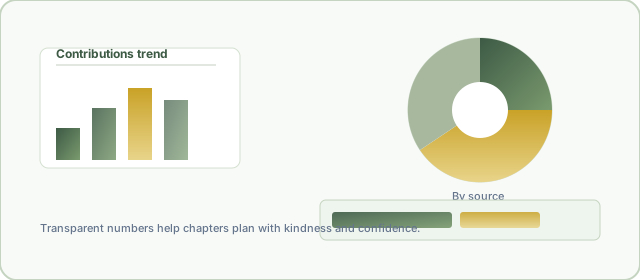
Illustration of charts and breakdowns for community reporting

In the admin portal, authorised staff can open financial views (revenue, donations, invoices, fines and fees, payment reversals), membership insight (demographics, retention, dependants, next of kin), group and campaign performance, communications history, SMS usage, and survey summaries—alongside long-standing operational tools. Members see their own contribution history, wallet statement, campaign standing, fees and fines, and dependants. Group Admins see the same ideas lifted to chapter level: group contributions, member status, campaign progress, wallet activity, and who still owes what.

Admin

National & operational scope

Members

Personal history & wallet

Group Admin

Chapter-level insight

Start from this page’s search box, or jump to the in-portal Reports FAQ after you sign in—those guides sit beside the live screens so help always matches the buttons in front of you.

How do I access my personal reports as a member?

Your story in CAS-UK is yours first. Sign in through the member login you already use for contributions and wallet, then open Reports from the member navigation. You will land on a calm hub that mirrors the Glamorgan styling across the site—large type, gentle moss tones, and plain-language labels so you never feel like you have walked into a spreadsheet by mistake.

Typical path: Members homeReports → choose Contribution History, Wallet Statement, Campaign Status, Fines & Fees, or Dependants.

Each screen sticks to your member record—no peeking into neighbours’ balances. If you need a printable trail for your household budget or a trustee, use the export buttons where they appear (CSV and PDF are offered on the heavier ledgers).

For questions about labels or columns, the member Reports FAQ inside the portal walks field-by-field—open Members → Reports FAQ after logging in.

What reports can a Group Admin see?

A Group Admin shepherds one chapter—not the whole union—so GA reports honour that boundary. After GA login, the Reports area shows group contribution summaries, member status (active, suspended, probationary), campaign performance for the chapter, wallet activity across members in the group, and outstanding payments (fees and fines that still need care).

Pastoral use

See who might need a phone call before a campaign closes—not to shame, but to accompany.

Exports

Contribution summary supports Excel-friendly formats; wallet and outstanding views support CSV and PDF for treasurers.

Deeper help lives beside the product: GA Reports FAQ (after sign-in).

What financial reports does the admin portal offer?

Trustees and finance volunteers asked for one place to answer “where did support flow this quarter?” The admin financial suite responds with layered ledgers: a Revenue Overview that stitches campaign income, visitor donations, wallet reloads, SMS purchases, and fee lines into a single narrative; a Donation Report for public gifts; Invoices tied to campaigns; the flagship Contribution Report with filters and charts; Fines, Fees & Registration for registration, suspension, reactivation, and missed-contribution lines; and a Payment Reversal Audit when card or wallet events unwind.

Every screen is permission-gated. If a menu item is missing, your role has not been granted that lens—ask a super admin rather than sharing passwords.

Tour the in-app guide at Admin → Reports FAQ once you are logged in with the right access.

How do I export a report to Excel, CSV, or PDF?

Exports are intentionally obvious: when a report supports download, you will see export actions near the filters or KPI cards—no buried menus. Choose your format, confirm the date range first (most views default to roughly the last ninety days), then download. Excel (XLSX) opens in spreadsheets for treasurers; CSV feeds legacy tools; PDF preserves layout for meetings and print packs.

  1. Set filters so the on-screen table matches what you want on paper—filters combine with AND logic.
  2. Click the export control and pick XLSX, CSV, or PDF.
  3. Open the file locally; PDFs use print-friendly tables when charts cannot travel server-side.
XLSX CSV PDF

If a report is view-only (some GA and member summaries), the interface will not pretend to export—respect that boundary.

What is the Contribution Report?

The Contribution Report is the flagship admin lens on campaign giving. It starts where treasurers start: who gave, through which channel, during which window, and how that compares to targets. Filters let you narrow by date, group, campaign, and more; KPI cards surface totals and participation at a glance; Chart.js visuals highlight trends without obscuring the underlying rows.

Think of it as the “pulse check” before a steering call: you can celebrate momentum, spot a soft week early, or prepare answers for auditors—all from the same screen. Exports mirror what you filtered, so the PDF you hand to a chairperson matches the numbers you just reviewed online.

Tip: Pair this report with the Revenue Overview when you need to explain campaign totals inside wider income (donations, fees, SMS).

What does the Revenue Overview show?

Where the Contribution Report drills into Njangi-style campaign flows, the Revenue Overview steps back to ask: “What entered the organisation overall?” It aggregates campaign contributions, visitor donations, wallet reloads, SMS package purchases, registration and joining fees, suspension and reactivation fees, and fines so leadership can narrate sustainability, not just a single ledger line.

Donut and trend visuals translate the totals for trustees who think in stories; the tables underneath still satisfy colleagues who think in audit trails.

What is the Fines, Fees & Registration report?

Mutual support only works when expectations are clear. This admin report lists fee and fine movements—registration and joining, suspension, reactivation, missed contributions—with paid and outstanding states side by side. It exists so registrars can reconcile compassionately: seeing arrears is never an excuse for harshness, but hiding arrears helps no one.

Filters typically cover date span, group, campaign, and fee type; charts show concentration by month and category. Pair the export with pastoral notes in your chapter minutes, not public posts.

Can I see my wallet statement as a member?

Yes. The member wallet statement is your running story of reloads, campaign payments drawn from balance, transfers, refunds, and fines—timed so you can reconcile with your bank app without shame or mystery. Charts often include a simple balance-over-time line so you can see seasons of giving, not just a single snapshot.

Exports (CSV/PDF) are there for households who file taxes together or share documentation with a trusted adviser—still scoped to your login.

How do I track my campaign contributions?

Open My Campaign Status under member reports. Each row is a promise you made to the community: enrolled or not, how much you have paid, how much remains, and whether the system considers you fully caught up. It complements live contribution pages by giving a calmer retrospective—ideal the night before a deadline.

If you also want raw chronology across every campaign, pair it with My Contribution History for the time-ordered view.

What does Group Campaign Performance show?

Group Admins see chapter-level momentum: participation rate, total collected versus target, and average contribution per member for each active campaign. Progress visuals make it obvious where encouragement—not pressure—might help before the window closes.

It is the GA counterpart to the national Contribution Report: same spirit, tighter scope, kinder context.

How do I check outstanding payments in my group?

Use Group Outstanding Payments in the GA reports hub. It gathers unpaid fines and fees—registration, suspension, reactivation, missed contributions—so you can plan pastoral follow-up. Donut breakdowns show which fee types weigh heaviest; exports help treasurers align with chapter meetings.

Approach every row as a pastoral signal, not a leaderboard. The goal is restoration, not embarrassment.

What is the Member Demographics report?

Demographics here means “who makes up CAS-UK right now?”—broken down by group, membership type, and status (active, suspended, probation). Pie and bar charts translate spreadsheets into human sentences: Are we growing youthfully? Do certain regions need more shepherds? The report supports planning without exposing individual member stories in public spaces.

What does the Broadcast History report show?

When pastoral news must reach thousands, channels multiply—email, SMS, Telegram, push. Broadcast History lets authorised admins review what went out, when, and through which channel, with counts that help explain deliverability. It is the institutional memory that stops “did anyone tell the diaspora?” from becoming a anxious group chat.


Email

SMS

Telegram

Push
Can I see survey results in reports?

Yes—where your admin role includes survey reporting, the Survey Results summary turns qualitative listening into shareable charts: response counts, completion rates, and per-question distributions. It is how a community proves it heard feedback without exposing individual replies inappropriately.

Use it after AGMs, training sessions, or pilot programmes to close the loop: “You spoke; here is what we learned.”

Back to Contact Us